flynreelow
Known around here
- Dec 12, 2016
- 1,662
- 1,573
I think member @modplan is a pro at it.Not yet. It looks promising though, compared to the setup of Frigate.
i still need to test it out.
I think member @modplan is a pro at it.Not yet. It looks promising though, compared to the setup of Frigate.

I just came aware of Frigata a few weeks ago; definitely looks promising on Apple siliconNot yet. It looks promising though, compared to the setup of Frigate.
get it goin and report back.I just came aware of Frigata a few weeks ago; definitely looks promising on Apple silicon

@wittaj @CCTVCam @tigerwillow1 Though if we're being honest, with an F1.0 lens on a 1/1.8" 4K sensor, that eufy S3 Pro camera probably performs in the same range as the Ubiquiti G6 Pro! I don't think Ubiquiti is going to be able to fix the G6 Pro via firmware—it is handicapped by its slow varifocal lens. Perhaps they can drop the shutter speed from 1/120 to 1/60 to allow the sensor to reduce gain/grain somewhat—there is no use running the shutter at 1/120 if that means stacking 4 frames together (puts you right back at an effective 1/30 second exposure) to bring the noise back down.
Send your analysis to Ubiquiti - they can use an expert like you onboard their development teamSlowest shutter I ever run is 6ms = around 1/160th and I prefer 4ms = 1/250th which is what I run most cameras at. I found anything less and you can get blur even though in theory a slower shutter (1/125) should still freeze most motion. Compression probably has a hand somewhere.
Whilst it may make the picture more usable in static quality terms at night, I would not consider your proposed 1/60th usable for motion. Gain also has a big hand in PQ and that is very evident in the video example above. With a reduction in gain a further reduction in shutter speed would probably be needed to compensate further although the image would clean up non motion wise.
G6 Pro is an example of why larger sensors are needed. f1.5 gives a better dof with a larger sensor. However, the aperture change more than halves the available light (it's approx 1 1/3rd stops down vs f1.0). That's likely the issue. However, theoretically if a camera can run 1/250th, it should produce approximately the same result at 1/125th with 1 stop less light.
Assuming my math is correct, with an f1.5 , it's 1 1/3rd stops of light from the 4kt's f1.0 to f1.5, so you'd probably be looking at an equivalent shutter of @ 1/90 th or 11 ms.
Given for many who want a brighter picture, 6ms or 1/160th on a 4kt maybe more realistic. (Even then in very low light it's dark). You'd probably be looking at 14ms or 1/70th on the G6 for the equivalent brightness of 6ms on a f1.0, which then explains the blur. Obviosuly the brighter you go by slowing shutter, the more of an issue slow shutter becomes.
Needless to say, anything other than zoom wide open, on this sensor / lens combination is likely a big problem as shutters would have to slow considerably further to compensate as the aperture narrows further.
This all assumes my math is correct, but my understanding is 1 stop down = 1/2 the available light and thus a need to slow the shutter also by 1 stop = halving the shutter speed.
Whilst I've often said the 4kt needed a smaller aperture to achieve greater dof, it's quite obvious doing the math (if it's correct) that a larger sensor would also be needed but then you have to re-eaxmine the aperture to sensor size relationship. It maybe no coincindence that some of the action cameras on 1 inch sensors are running f`1.9 apertures. The porblem is the larger you go, the narrower the aperure needed to retain dof, so the juggling continues. Bit beyond my field of knowledge though.

Not sure I would say "pro" lol. But I absolutely love it. Compared to Blue iris and regular Frigate in docker Fregata is a beast. Happy to answer questions anyone has.
The Reolink POE doorbell is fantastic.Not sure I would say "pro" lol. But I absolutely love it. Compared to Blue iris and regular Frigate in docker Fregata is a beast. Happy to answer questions anyone has.
I have all ubiquiti networking gear too, I'm thinking about getting one of their doorbells, just since no one else makes a good PoE doorbell, but the rest of their cams are crap and way too locked down settings-wise for me to even consider them. I don't need settings my grandma can use, I need a good picture at night for security, that's what is most important and why I'm spending money on cams.
I also hate how Ubiquiti took away RTSP streams direct from the cameras, they used to have it, but they removed it. Now it has to proxy through their protect software (which adds delay) just to get an RTSP stream for an external service like blue iris or fregata. Infuriating, they're just trying to lock you into their ecosystem so you can't get out. How long until they remove RTSP completely?
I need to take a look at the reolink doorbells again. last I looked they had a white version and a black version, I needed the aspect ratio of the white one for my scene, but needed black to better match dark siding. I would have bought instantly if they had both aspect ratios in both colors. maybe a newer version solved this.


Send your analysis to Ubiquiti - they can use an expert like you onboard their development team

Getting better...
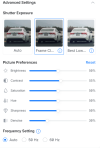
There was one firmware update to 5.3.94. I have 2 other IR cameras lighting the area, but all but the first test or two have had those on this entire time. I did zoom the camera in more due to reflections off the eaves and a bush right below it and walls directly adjacent. I think that may have contributed the most. I did raise the frame rate back to 1/120. I've made subtle changes to brightness, contrast, and denoise.Same firmware? Did you add any external IR illuminators?
How were you able to adjust the frame rate?There was one firmware update to 5.3.94. I have 2 other IR cameras lighting the area, but all but the first test or two have had those on this entire time. I did zoom the camera in more due to reflections off the eaves and a bush right below it and walls directly adjacent. I think that may have contributed the most. I did raise the frame rate back to 1/120. I've made subtle changes to brightness, contrast, and denoise.
Auto frame rate does 1/30 at night. Frame Clarity setting puts it at 1/120. As you know, there's no settings besides 3 choices. It's not granular. But, if you enable the settings readout to show on the video, it shows what the frame rate is being used. I'd love to be able to move it more. But, I think the brightness level and the denoise were also contributing factors. Changing those seemed to help some too.How were you able to adjust the frame rate?
Thanks for pointing that out actually. On some of my Dahua cameras, I have the shutter speed set to 1/120 for night-time performance as well. Can make a difference depending on ambient lighting for ID'ing people while they are in motion.Auto frame rate does 1/30 at night. Frame Clarity setting puts it at 1/120. As you know, there's no settings besides 3 choices. It's not granular. But, if you enable the settings readout to show on the video, it shows what the frame rate is being used. I'd love to be able to move it more. But, I think the brightness level and the denoise were also contributing factors. Changing those seemed to help some too.
It looks like that's the lowest shutter it is going down to at night. During the day, even set to Frame Clarity, I am seeing shutter speeds vary from 1/120 in the early morning light to 1/1000 or 1/2000 or even 1/4000 throughout the day. I'm going to keep it on Frame Clarity and mess more with these other settings.Thanks for pointing that out actually. On some of my Dahua cameras, I have the shutter speed set to 1/120 for night-time performance as well. Can make a difference depending on ambient lighting for ID'ing people while they are in motion.
Its too bad we cannot set the shutter speed depending on time of day. If I select Frame Clarity, then it is set for Frame Clarity 24/7, not for 10 out of 24 hours for a day.