BI 6 not using Nvidia Card

mvoss

Getting the hang of it
Oct 21, 2023
107
88
Texas
I'm sure this has been explained before but I can't find it.

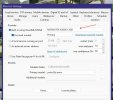
I just upgrded to BI 6.0.8.5 from 5.x. The AI on 6 seems to be working fine but it will not fire using my Nvidia Card, RTX3050. It will only work w/ the internal UHD Graphics 770.

Am I do something wrong, or do you fine folks need more information. Could it be my Nvidia Drivers? These drivers worked with BI 5 and CPAI.

I am using Yolo26s at the moment but I get the same results on Yolo8 and Yolo 10.

Thank you,

Michael
 
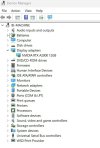
@Tinman, I apologize I wasn't very clear. BI sees the card but it will sometimes miss AI notifications and when it does pick it up it's slower than the built in UHD card.

For instance the UHD card will alert in 74ms while the Nvidia is 350ms. I've been testing it w/ same camera, lighting, etc. The Nvidia card will sometimes report a error 1460, which I believe is a timeout error.

Never happened on CPAI.

Just curious if I'm missing something. The only other issue, I'm working through, is some static images.

Other than that, you were right BI 6.0 install was flawless.

Thanks again,

Michael
 
I'm going to try some tinkering, and see if my Intel 630 UHD Graphics chip is any quicker at AI than my Nvidia RTX 3060ti.
I'm not sure which value being displayed in AI inspector is the one we are shooting for....
I may have my system hosed up with defaults that check for too many objects.
Of course now the traffic has died down....so it will be awhile.....before i get a car going thru the frames.
 
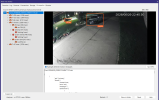
These look like extremely Gihugic numbers compared to yours. But maybe I'm checking for too many objects? Seems like a laundry list of things to sort out.
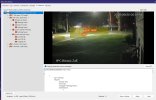
this the rtx3060
1782795126848.png
 
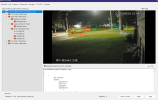
When I went to BI6 I uninstalled codeproject and any folder associated with it. I also uninstalled all the Cuda NVidia files completely and now just run the Nvidia driver and Nvidia desktop manager...period. No more cuda install programs. Everything runs fine. I am surprised your onboard video would out perform your NVidia RTX 3060.

Screenshot 2026-06-30 103058.jpg

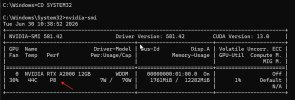
I also use to run a bat file to control my Nvidia card performance. Here is a great video explaining that. I now just run my card at its default P8 performance as it is all I really need.

Screenshot 2026-06-30 104407.jpg

 
Last edited: