Can't use sub streams?

cmx

Getting the hang of it
Nov 9, 2024
127
53
NJ
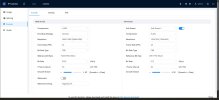
I have 6 identical cameras out of the 6 only one of them will let me use the sub stream! All 6 have sub stream turned on all use the same ports, settings, firmware, codec.

But BI using the latest version will not find the substreams on the other 5, i even tired to clone the working cameras settings and then i would just not get video.

The correct video path is

/cam/realmonitor?channel=1&subtype=0&unicast=true&proto=Onvif


if i use that on one of the other 5 i get no video.
 

Attachments

  • 1.jpg
    1.jpg
    80.9 KB · Views: 9
  • 2.jpg
    2.jpg
    70.3 KB · Views: 9
I have 6 identical cameras out of the 6 only one of them will let me use the sub stream! All 6 have sub stream turned on all use the same ports, settings, firmware, codec.

But BI using the latest version will not find the substreams on the other 5, i even tired to clone the working cameras settings and then i would just not get video.

The correct video path is

/cam/realmonitor?channel=1&subtype=0&unicast=true&proto=Onvif


if i use that on one of the other 5 i get no video.
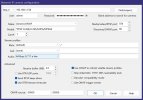
FWIW, the URL you posted is for main stream (subtype=0).

When you say ".... All 6 have sub stream turned on...." does that mean you've logged into each camera's webGUI and enabled/configured the sub stream?

EDIT: Are you using "Find/Inspect" to populate the BI video configuration boxes?
 
Last edited:
  • Like
Reactions: Flintstone61
FWIW, the URL you posted is for main stream (subtype=0).

When you say ".... All 6 have sub stream turned on...." does that mean you've logged into each camera's webGUI and enabled/configured the sub stream?

EDIT: Are you using "Find/Inspect" to populate the BI video configuration boxes?

Yes find and inspect leaves it blank, Yes all had the sub stream on by default but i did log in and check.

even if i put /cam/realmonitor?channel=1&subtype=0&unicast=true&proto=Onvif

The other 5 will not show any video unless it's left blank.
 
  • Wow
Reactions: TonyR
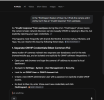
All 5 are the same.

Device Model
IPC-Color4K-T180

Audio Input
1
Audio Output
1
Alarm-in Port
1
Alarm-out Port
1
ONVIF Version
24.12(V3.1.0.2313712)
System Version
V3.140.0000000.81.R, Build Date: 2026-05-08
Web Version
V5.01.0.2447661
Algorithm Version
V6.02.09.0
Security Baseline Version
V2.4
H5Player Version
V3.01.1

Copyright 2026, all rights reserved.
 

Attachments

  • t.jpg
    t.jpg
    93.8 KB · Views: 6
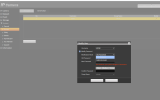
Goto whatever page/link the camera provides for Users / Accounts.
Select the tab that says Onvif.
Be certain whatever user you're putting in Blue Iris username has a matching Onvif user defined.
 
This has little to do with your issue but thought I'd mention these recommended initial camera settings for use with BI:
  • Encoding strategy: General (or Smart Codec: Off)
  • Encode mode: H264
  • Bitrate type: CBR
  • Bit rate: 8192
  • Frame rate: 15 FPS
  • Frame interval (iFrame): 15
 
A while back I had something (forgot what) that wasn't working on one camera, even though all its settings were identical to another same model camera that worked right. I eventually solved it by deleting the non-working camera and reinstalled it, copying the one that worked right.
 
A while back I had something (forgot what) that wasn't working on one camera, even though all its settings were identical to another same model camera that worked right. I eventually solved it by deleting the non-working camera and reinstalled it, copying the one that worked right.
Yes, I forgot about that....had a similar occurence years ago...
Kind of like how we sometimes forget about power cycling a glitchy device...it's too non-technical and uncomplicated to work, our subconscious thinks. :cool:
 
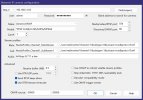
Post the results of the find/inspect window.

Couple of things, you need to up the Receive Buffer up to 20mb, you have it entirely too low.

Also, use H264H for your codec, 15fps, match Iframe to FPS.

Can you copy the links from the good camera and paste them in the dialog for the troublesome cams and it work?
 
  • Like
Reactions: TonyR
I even tried deleting the camera and re adding it.

Find and inspect.

Opening 192.168.1.159 port 80...
HTTP Get / request...
OK
ONVIF GetSystemDateAndTime
2026-07-05T06:07:03.000Z
Requesting device information...
Invalid response. Is the password correct?
GetCapabilities...
Querying services
Has Imaging services: /onvif/imaging_service
Has media services: /onvif/media_service
Has RTP_RTSP_TCP, requesting profiles
Has Event services: /onvif/event_service
Has WSPullPointSupport
RelayOutputs: 1
InputConnectors: 1
Has Device IO services: /onvif/deviceIO_service
AudioOutputs: 1
Checking for common cameras...
Foscam FI86xx/98xx compatible?
Foscam FI89xx compatible?
Foscam FI9821 V2 compatible?
Foscam FI9821 media port compatible?
Cantonk port 34567?
RTSP port open?
RTSP port detected!
Done
 
I am no expert but this line (Invalid response. Is the password correct?) indicates that perhaps you have the wrong user ID and password?
Perhaps it would help to look at the the find/Inspect from the working camera to see what is different!
 
  • Like
Reactions: TonyR
I even tried deleting the camera and re adding it.

Find and inspect.

Opening 192.168.1.159 port 80...
HTTP Get / request...
OK
ONVIF GetSystemDateAndTime
2026-07-05T06:07:03.000Z
Requesting device information...
Invalid response. Is the password correct?
GetCapabilities...
Querying services
Has Imaging services: /onvif/imaging_service
Has media services: /onvif/media_service
Has RTP_RTSP_TCP, requesting profiles
Has Event services: /onvif/event_service
Has WSPullPointSupport
RelayOutputs: 1
InputConnectors: 1
Has Device IO services: /onvif/deviceIO_service
AudioOutputs: 1
Checking for common cameras...
Foscam FI86xx/98xx compatible?
Foscam FI89xx compatible?
Foscam FI9821 V2 compatible?
Foscam FI9821 media port compatible?
Cantonk port 34567?
RTSP port open?
RTSP port detected!
Done

The invalid email response means the ONVIF username/password is wrong.

That usually means an ONVIF password issue.

These devices keep users and ONVIF users as separate and if the password doesn't match in the ONVIF manager list (which happens frequently when people start changing passwords or use the ConfigTool), then the cameras cannot be "seen". Or sometimes the firmware just goes wonky as it sounds like it might be the case with you.

Either reset the password or create a user just for BI
 
  • Like
Reactions: VorlonFrog
In updating my NVR password, and having it be the same across all cams, I was fooled into thinking I was all good. Then the ONVIF user trouble started. and the ONVIF IVS and tripwires were giving me " get events Error"
This was the clue to help me realize i fhad to painstakingly go through and login into all the cameras, and revisit the ONVIF user "edit" in some cases it understood there was an "old ONVIF pwd that was the challenge to allow a new Pwd to be created.
In some instances the old pwd challenge threw errors, and there was on option to delete the ONVIF user, and then it threw an error for not being able to delete the administrators ONVIF,
Plan C did the trick.
Modify the ONVIF user by means of entering the admin challenge PWD.
Even though I was going to input the same PWD in ONVIF PWD modify boxes, that I had used for creating the admin account.
It accepted it and the "find Inspect"
"Invalid response" went away in Blue Iris and the get events errors disappeared.
1783393309273.png
 
I am no expert but this line (Invalid response. Is the password correct?) indicates that perhaps you have the wrong user ID and password?
Perhaps it would help to look at the the find/Inspect from the working camera to see what is different!

The user and ONVIF user use the same user/pass. Copy and pasted. I really don't want to double my passwords and have one for each.
 
  • Like
Reactions: Flintstone61
I get what your saying CMX. I was able to get it that way last night ( on the ONVIF cams)
Not all mine have an "ONVIF" user designation. Like the Lorex and the Amcrust 1179's
The screen a bit different for them.
Version 3 of the 1179 is designated AI, so I'm thinking the user interface for ONVIF might be more like EmpireTech/Dahua.