

I got a new camera from Andy which I have yet to install, but I was thinking about a feature that would be cool. This cam has the capability to rotate completely in 360 degrees without any hard stop to it-- it can fully spin. 
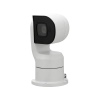
EmpireTech PTZ1A2M-25X 1/2.8" CMOS 2MP
25× Starlight IR 4.8mm–120mm Vari-Focal Positioning System PTZ Camera.
I am going to be mounting this big beast on my roof in some manner yet to be determined, and primarily using it to get shots of the sky-- it can be pointed straight up.
QUESTION:
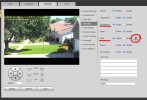
Is there a way to make an overlay that would give me Compass Headings for where the lens is aimed on the horizontal plane?
It feels like this overlay would be reliant on the Camera knowing which way it is pointing, and I don't think that is part of the firmware or hardware capabilities. So--- I put this one out to the braintrust here to see if someone might have an idea about how to do this. Any ideas??
EmpireTech PTZ1A2M-25X 1/2.8" CMOS 2MP
25× Starlight IR 4.8mm–120mm Vari-Focal Positioning System PTZ Camera.
I am going to be mounting this big beast on my roof in some manner yet to be determined, and primarily using it to get shots of the sky-- it can be pointed straight up.
QUESTION:
Is there a way to make an overlay that would give me Compass Headings for where the lens is aimed on the horizontal plane?
It feels like this overlay would be reliant on the Camera knowing which way it is pointing, and I don't think that is part of the firmware or hardware capabilities. So--- I put this one out to the braintrust here to see if someone might have an idea about how to do this. Any ideas??


 We need a THINKING emoji.