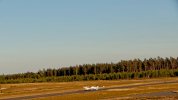
Getting JPG from fast moving object

rauska2

n3wb
Nov 13, 2023
15
7
finland
Hello, I have a timing question.
I want to take a JPG picture of an airplane flying at about 120 km/h during a landing.

The camera's field of view is 50m wide at the target distance.
At that time, the airplane is visible for about 1.5 seconds.
Video: 3840x2160 26 fps.

I would like BI to take a picture where the airplane is roughly in the middle of the picture, i.e. at 0.75 seconds.On the other hand, if the picture was taken at about 0.5 - 0.9 seconds, then the entire airplane would be in the picture at a speed of 100-140 km/h.

Now the settings are as follows, which most often result in two pictures. So what setting should I change so that I only get one picture?

Motion trigger make time 0.3 s
Motion End trigger if not re-triggered 0.3 s
JPEG each 0:00.9
pretrigger rec time 0 s
pretrigger play time 0 s

Video is not saved, which is the intention.

A solution could be if the option (when triggered each m:ss.s) had an option to take one picture after a selected time. But maybe by adjusting those earlier ones, that one picture would be successful.
 
Could you setup a trip wire to trigger when the plane gets to the middle of the view, does the your camera have any sort of built in AI or trigger logic!
 
The trip wire would be part of the Cameras AI, but you don't have any!

I would suggest that you look at the Zones & Hotspots setup on the camera setup, "Motion/Trigger", "Enable motion sensor" then click on the "Configure" button, Then select "Use zones and hot spot", click on "Edit zone map" once on that screen click on the help button and start reading about zone crossing and the hot spot zone. Come back and ask further questions if needed!
 
You do realise that CCTV cameras don't produce pictures you can zoom into well? (A PTZ can but only because it optically zooms in before the capture not into the final picture). If you take a picture using a regular wide angle camera, then there's virtually no chance of it ever being anything more than a spec in sky zoomed out, or an unrecognisable blurry blob if zoomed into the capture. This really sounds like a job for a DSLR.,
 
  • Like
Reactions: Bruce_H
You do realise that CCTV cameras don't produce pictures you can zoom into well? (A PTZ can but only because it optically zooms in before the capture not into the final picture). If you take a picture using a regular wide angle camera, then there's virtually no chance of it ever being anything more than a spec in sky zoomed out, or an unrecognisable blurry blob if zoomed into the capture. This really sounds like a job for a DSLR.,
Well, I don't need to zoom in on the picture because it's enough that the plane is visible.
 

Attachments

  • Plane.png
    Plane.png
    969.5 KB · Views: 19
The trip wire would be part of the Cameras AI, but you don't have any!

I would suggest that you look at the Zones & Hotspots setup on the camera setup, "Motion/Trigger", "Enable motion sensor" then click on the "Configure" button, Then select "Use zones and hot spot", click on "Edit zone map" once on that screen click on the help button and start reading about zone crossing and the hot spot zone. Come back and ask further questions if needed!
This was a good suggestion, thanks!
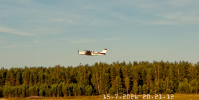
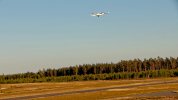
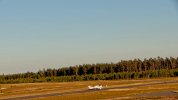
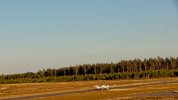
Now I get one picture of the plane pretty accurately in the middle of the image area.

With the following settings it worked: I made two zones A and B, about 5% overlapping .
A-zone is more sensitive than B-zone (Re-Triggers).

1. Triggering happens when the target moves A-B, i.e. in any direction.
2. Trigger method Edge-vector and time is 0.2 s 2 times in 1 sec.
3. End trigger if not re-triggered within 1.0 sec (Break-time)
4. Max trigger duration 5-6 sec. (The plane has already left the image area)
5. JPEGs When triggered and each m:ss.s setting 5-6 sec.
So the first picture is taken during the first second at 2*0.2 sec= 0.4 sec. Compare point 2.

6. All Pretrigger times are 0 sec.And no video with the trigger, because I just need a picture of the plane.


Cam128.20260717_172359540Z.jpgCam128.20260717_172810106Z.jpgCam128.20260717_173241836Z.jpgCam128.20260717_173725629Z.jpg
 

Attachments

  • Cam128.20260717_161221466Z.jpg
    Cam128.20260717_161221466Z.jpg
    684.3 KB · Views: 14
This was a good suggestion, thanks!
Now I get one picture of the plane pretty accurately in the middle of the image area.

With the following settings it worked: I made two zones A and B, about 5% overlapping .
A-zone is more sensitive than B-zone (Re-Triggers).

1. Triggering happens when the target moves A-B, i.e. in any direction.
2. Trigger method Edge-vector and time is 0.2 s 2 times in 1 sec.
3. End trigger if not re-triggered within 1.0 sec (Break-time)
4. Max trigger duration 5-6 sec. (The plane has already left the image area)
5. JPEGs When triggered and each m:ss.s setting 5-6 sec.
So the first picture is taken during the first second at 2*0.2 sec= 0.4 sec. Compare point 2.

6. All Pretrigger times are 0 sec.And no video with the trigger, because I just need a picture of the plane.


View attachment 246447View attachment 246448View attachment 246449View attachment 246450
Thanks for posting back with the solution that works for you, other may find this method useful for other situations.
 
  • Like
Reactions: rauska2
6. All Pretrigger times are 0 sec.And no video with the trigger, because I just need a picture of the plane.


View attachment 246447View attachment 246448View attachment 246449View attachment 246450
It looks like you have something that works, but... Have you considered running motion detect really sensitive so that it detects that something is there - whether right or wrong, then feed it to AI? Then you would pull an image after it confirmed that there's a plane present. You could mask off the sky so that a flying plane doesn't get counted - like your first image. I ran the four above through Blue Onyx, and it pegged all of them. I wonder what it would do at night - assuming you have night use of the runway - and whether it could ID that sort of image. Also would / could ignore other vehicles / people that may go by the camera if it's that far from the runway.
Screenshot 2026-07-30 170927.pngScreenshot 2026-07-30 170959.pngScreenshot 2026-07-30 171038.pngScreenshot 2026-07-30 171206.png
 
  • Like
Reactions: rauska2
It looks like you have something that works, but... Have you considered running motion detect really sensitive so that it detects that something is there - whether right or wrong, then feed it to AI? Then you would pull an image after it confirmed that there's a plane present. You could mask off the sky so that a flying plane doesn't get counted - like your first image. I ran the four above through Blue Onyx, and it pegged all of them. I wonder what it would do at night - assuming you have night use of the runway - and whether it could ID that sort of image. Also would / could ignore other vehicles / people that may go by the camera if it's that far from the runway.
View attachment 246970View attachment 246971View attachment 246972View attachment 246973
The current system works well and counts both those in the air and those about to land. No taxiing, taxiway closed. The airport is a private unmanned airport, but the state agency requires a number of landings each year. There is no nighttime air traffic, no lights on the airport. The only disturbance comes from birds flying in front of the camera. Could you tell me how to get the picture only after confirmation?