Clock and date on Camera NOT B.I.

BI cannot fix what a camera is sending to it. You either have the camera provide the date/time or you turn off the date/time in the camera and let BI provide it.
 
I have NetTime running on my BI server and all cams synced to it. Then I have the camera's time/date displayed and BI's time/date overlay disabled. More info below:

 
You need to use the old Explorer

How to enable native Internet Explorer in Windows 10 and 11:

Open Notepad:

Copy then paste the single line of code below into Notepad:

CreateObject("InternetExplorer.Application").Visible=true

Save as OpenIE.vbs

Make sure the the file name ends in .vbs not .txt, If it ends in .txt you must rename to .vbs

Create a shortcut to the above file and double-click it anytime you want native Internet Explorer.
 
Here is another possibility for accessing old cameras, you can turn on IE mode in edge using this registry file

Create a text file and past the Bolded text below into it, save the file then rename it to IE Mode for Edge.reg
After that is done just double click on the file to merge it into the windows registry.

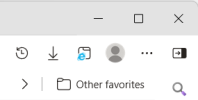
Open Edge and you should see the IE mode icon in the status bar at the top right ( the icon with the little blue "e" ) the internet will give you lots of info on how IE mode works in MS Edge!

1780000823802.png

Windows Registry Editor Version 5.00

[HKEY_LOCAL_MACHINE\SOFTWARE\Policies\Microsoft\Edge]

"InternetExplorerIntegrationLevel"=dword:00000001

[HKEY_LOCAL_MACHINE\SOFTWARE\Policies\Microsoft\Internet Explorer\CommandBar]

"ShowCompatibilityViewButton"=dword:00000001