It looks like better ONVIF support is coming to UniFi Protect

If you own any third-party ONVIF cameras, I still highly recommend you hold onto the AI Ports especially for CPU offload processing
Good point. AI ports for me never really worked great. Some cameras have pretty bad delays, even with both units having at most 2 HD streams and the occasional update popping my cameras out of the Ports and needing to reconnect them. Also the bitrate seems funky which isn't that big of a deal. Kinda wish (and thought) the AI in the NVR would be a replacement so there is still gap which the AI port will still have to fill. Curious about the AI Port X, would be nice having just one unit handling everything, depending if it's a good deal
 
  • Like
Reactions: Arjun
Good point. AI ports for me never really worked great. Some cameras have pretty bad delays, even with both units having at most 2 HD streams and the occasional update popping my cameras out of the Ports and needing to reconnect them. Also the bitrate seems funky which isn't that big of a deal. Kinda wish (and thought) the AI in the NVR would be a replacement so there is still gap which the AI port will still have to fill. Curious about the AI Port X, would be nice having just one unit handling everything, depending if it's a good deal
I just read on reddit that the third-party cameras like Dahua/Hikvision still require AI Key, meaning that the onboard Edge AI in the G2 NVRs only work in tandem with native UniFi cameras. Ubiquiti ran a deal last year on Black Friday selling the AI Keys for $150 - I wouldn't mind buying a few more for my existing Dahua camera setup (which is still my primary means); I only have 4 UniFi cameras (including Doorbells) outdoors
 
  • Like
Reactions: kolt_
Correct me if I'm wrong, but doesn't Protect already support IVS events (line crossings, etc)? Also, the IVS events are technically part of ONVIF, so it should work in the latest update, making those IVS events essentially Smart Motion Detection events (they will be denoted by markers on the playback timeline)
Protect supports line crossing for Unifi cameras. I haven't tried it myself, but apparently latest version of Protect only supports ONVIF events for Motion Detection, and not Line Crossing, etc. It looks like someone from this forum should look into this, the "normal" Unifi users are not good in this kind of investigations :)
 
  • Like
Reactions: Arjun
I can confirm with ver. 7.1.55 Protect will not work with my line crossing IVS rules, however it will send me alerts by using the cameras generic video/smart detection but you're going to get a million false alerts.
 
I’m on early access 7.1.55 and still not able to get any type of motion alerts to my protect with Dahua cams. I have seen recent posts on Reddit of people with cheap Tapo cams now getting onvif detections.
Same here, I adopted several 54IRs, set up motion zones with the highest sensitivity and I'm not getting any events recorded. Zones are the only option I see, no line crossing. I'm currently running Protect v7.1.60.
 
  • Like
Reactions: Arjun
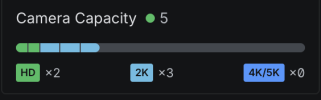
Also, I adopted 5 54IRs all running the exact same firmware. Unifi Protect sees them with different recording resolutions. I don't really ever see Protect replaces BI as my solution, but I was curious to test it out after the recent update.

1779144097224.png
 
  • Like
Reactions: Arjun
I don't recommend UniFi's Protect system - I had to do a factory reset on my UNVR today after upgrading Protect to 7.1.60 because my alarm manager configuration broke, nothing worked - now I am working tirelessly to restore everything
 
I don't recommend UniFi's Protect system - I had to do a factory reset on my UNVR today after upgrading Protect to 7.1.60 because my alarm manager configuration broke, nothing worked - now I am working tirelessly to restore everything
If it came down to a problem with software then I wouldn't ever recommend anything. With Ubiquiti, I recommend their hardware and software all the time. It works well, the cost is reasonable, and the software is usually very good. And it is easy to setup for most normal people.

Can there be a problem here or there? Sure, it is software. But I trust Ubiquiti with software development and updates and getting it right. They are a publicly traded company.
 
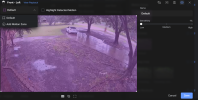
I feel the latest update is a step backward on Unifi Protect. Now for my setup I am using all Hikvision and Dahua cameras. AI Port for all of the cameras. With the latest update... Actually I believe since the last two updates or whichever one that supposedly added ONVIF motion support, the cameras would keep triggering on a parked car on my property. This would show up in "find anything" for every minute. Also insects like moths or spiders would trigger it. Same for any changes in pixels in the image. I did go into motion zones and lowered the sensitivity all the way and it did help minimize the triggers. I can't figure out a way to actually delete the "default" zone. Can only add a new zone. If I still get false alarms I guess I can shrink the detection area as small as it will go.
1780667727945.png
 
  • Like
Reactions: Techie007L
I don't recommend UniFi's Protect system - I had to do a factory reset on my UNVR today after upgrading Protect to 7.1.60 because my alarm manager configuration broke, nothing worked - now I am working tirelessly to restore everything
I've had the same problem multiple times with their integrated networking solutions. Their Cloud Key corrupts itself while updating firmware, or after random power failures, and then you have to completely erase it and start over again. Since the Cloud Key is the only intelligent part in their UniFi lineup, that means no dashboard (to see what's happening on your network) and no settings until you factory reset it. And factory resetting it of course erases all settings for every UniFi device in your network. It's a pain! Needless to say, I don't use Ubiquiti anymore except for their point-to-point radios, which configure like normal equipment (i.e. each device has its own config page).
 
  • Sad
Reactions: Arjun
I've had the same problem multiple times with their integrated networking solutions. Their Cloud Key corrupts itself while updating firmware, or after random power failures, and then you have to completely erase it and start over again. Since the Cloud Key is the only intelligent part in their UniFi lineup, that means no dashboard (to see what's happening on your network) and no settings until you factory reset it. And factory resetting it of course erases all settings for every UniFi device in your network. It's a pain! Needless to say, I don't use Ubiquiti anymore except for their point-to-point radios, which configure like normal equipment (i.e. each device has its own config page).
That sucks to hear - I don't think most of their fanbase fully use the Ubiquiti software to realize how it sucks badly.
 
None of my 54IRs from Andy are triggering motion events in UniFi Protect for me. I guess not all cameras types are compatible.
 
  • Sad
Reactions: Arjun
None of my 54IRs from Andy are triggering motion events in UniFi Protect for me. I guess not all cameras types are compatible.
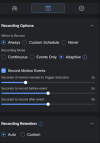
I don't get any triggers on my cameras not added to the AI port. I have a few 8MP pano cameras which the resolution is higher than what the AI port supports. Just my luck that I am also not able to drop the resolution on one of them. Now the million dollar question is.... Are you suppose to be able to view motion events as I have nothing except for "record motion events"
1780691160767.png
Not giving me options to select the area.

OR

Am I suppose to set up the motion events from the camera directly? This would usually mean the Unifi Protect side would either understand the metadata it is receive from the camera.... Or the camera has ONVIF Profile T or M support which would allow for motion and other metadata to be in more of a universal format. Most cameras only have the basics which is S and G which is just liveview, playback, recording and if you are lucky....audio from the built in mic.

 
I don't get any triggers on my cameras not added to the AI port. I have a few 8MP pano cameras which the resolution is higher than what the AI port supports. Just my luck that I am also not able to drop the resolution on one of them. Now the million dollar question is.... Are you suppose to be able to view motion events as I have nothing except for "record motion events"
View attachment 244571
Not giving me options to select the area.

OR

Am I suppose to set up the motion events from the camera directly? This would usually mean the Unifi Protect side would either understand the metadata it is receive from the camera.... Or the camera has ONVIF Profile T or M support which would allow for motion and other metadata to be in more of a universal format. Most cameras only have the basics which is S and G which is just liveview, playback, recording and if you are lucky....audio from the built in mic.
Are you updated to latest version of UniFi Protect? Recent updates enabled additional ONVIF events to be captured through the UniFi Protect software.
 
I've had the same problem multiple times with their integrated networking solutions. Their Cloud Key corrupts itself while updating firmware, or after random power failures, and then you have to completely erase it and start over again. Since the Cloud Key is the only intelligent part in their UniFi lineup, that means no dashboard (to see what's happening on your network) and no settings until you factory reset it. And factory resetting it of course erases all settings for every UniFi device in your network. It's a pain! Needless to say, I don't use Ubiquiti anymore except for their point-to-point radios, which configure like normal equipment (i.e. each device has its own config page).
I've never had my cloudkey corrupt itself so I may just be lucky. I have had my cloudkey gen 2 plus running for roughly over five years now. Now I have had issues with it though. Mine is one of the original versions of those that has the battery that goes bad and bloats/expands. Had to tear the whole thing down and pull out that battery. It is now battery-less. Also the POE went out on it so not able to power it up using POE. The port still passes data though. Just have to use a USB-C adapter to power it up. Also the mechanical hard drive showed it was dying after a year of cooking inside that enclosure. Replaced it with an SATA SSD and no issues along with less heat overall after that.
 
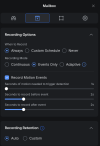
I'm running a Ubiquiti Dream Machine Pro and the latest release version of Protect. I have created motion zones with the highest sensitivity and to record events only. Getting no recordings at all. Continuous recording works as expected.

1780699734202.png
1780699859337.png
 
Last edited: