Looking for feedback: Windows software that turns a PC screen into an ONVIF camera

Jun 12, 2023
4
5
usa
Hi everyone,

I've been working on a Windows application that solves a problem I've encountered several times in POS and surveillance installations, and I'd appreciate feedback from installers, NVR users, and surveillance professionals.

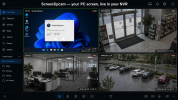
The application captures a Windows desktop (or POS terminal screen) and exposes it as a standard ONVIF / RTSP camera.

The goal is to allow a PC screen to be recorded by an NVR exactly like a regular IP camera, without requiring HDMI encoders, capture cards, or additional hardware.

Current features:

• ONVIF Profile S support
• Automatic ONVIF discovery by compatible NVRs
• RTSP H.264 streaming
• Main stream + Sub stream
• JPEG snapshot support
• Password-protected access
• Unique ONVIF identity per device
• Native C++ implementation
• No .NET or external runtime dependencies
• Compatible with Windows 7 SP1 through Windows 11 (x86 & x64)

Resource usage on my test systems:

• ~0% CPU when idle
• ~2% CPU while streaming
• ~70 MB RAM

My primary use case is POS systems where customers want the cashier screen recorded alongside their security cameras, but I can also see applications in training rooms, monitoring stations, and other environments where recording a desktop directly into an NVR is useful.

I'm interested in hearing from the community:

• Does this solve a problem you've encountered?
• Which NVR brands and models would you like to see tested?
• Would you consider using a software solution like this instead of HDMI encoders?
• Are there features you would consider essential before deployment?

If there is enough interest, I'd be happy to provide a beta version to community members for testing.

Thanks for your time and feedback.
 
Last edited:
  • Like
Reactions: Flintstone61
Sounds like it could be useful. I don't run any POS systems so not sure I would have a use case, but I can see where it could be great.

It also sounds smoother than a Hdmi encoder in many cases, that said many have surveillance cameras on a dedicated network (or should do!), but the network guys should be able to do a fine grained firewall rule from an NVR to the POS systems for 554 / the Onvif port only I suppose.

How does your application get configured? Config file? Gui?

Also, what operating systems do you target specifically? If Windows, does it run as a Windows Service?

I terms of NVRs, you could test with Dahua and Hikvision and of course Blue Iris. That would cover a lot of what's out there. Then there are the more enterprise solutions, but I should think (or hope, considering the price), that they should be pretty capable of ingesting any Onvif compliant stream.
 
Sounds like it could be useful. I don't run any POS systems so not sure I would have a use case, but I can see where it could be great.

It also sounds smoother than a Hdmi encoder in many cases, that said many have surveillance cameras on a dedicated network (or should do!), but the network guys should be able to do a fine grained firewall rule from an NVR to the POS systems for 554 / the Onvif port only I suppose.

How does your application get configured? Config file? Gui?

Also, what operating systems do you target specifically? If Windows, does it run as a Windows Service?

I terms of NVRs, you could test with Dahua and Hikvision and of course Blue Iris. That would cover a lot of what's out there. Then there are the more enterprise solutions, but I should think (or hope, considering the price), that they should be pretty capable of ingesting any Onvif compliant stream.
Thanks for the thoughtful feedback — much appreciated!

And you're right that it's not POS-only. Anywhere you'd like a screen to appear inside your existing NVR/VMS could be a use case: POS terminals, dashboards, control-room displays, digital signage, training systems, or simply monitoring a remote PC. POS just happens to be the most common request I've seen.

On the network side, I completely agree. Surveillance devices should ideally be isolated on their own VLAN. In this setup, the NVR only needs access to the PC on RTSP (554) and the ONVIF service port (8000). The web administration interface runs separately (default 8080) and doesn't need to be exposed to the camera network. WS-Discovery (UDP 3702) is optional as well — cameras can be added manually by IP if preferred. Authentication can be enabled for both ONVIF and RTSP access.

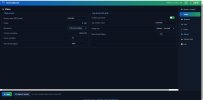
Configuration can be done in three ways:

  • Native Windows control panel / system tray application
  • Browser-based web interface
  • Plain-text configuration file
For operating systems, it currently supports Windows 7 SP1 through Windows 11, both 32-bit and 64-bit. It's a native C++ application with a static runtime, so there are no .NET or external dependencies to install. It can run either as a standard tray application or as a Windows Service for unattended operation.

As for NVR compatibility, Dahua, Hikvision and Blue Iris are exactly the platforms I'm focusing on first. The application exposes a standard ONVIF-compatible camera with H.264 RTSP streams (main and sub stream), so I'm hoping most VMS platforms will handle it without special configuration.

I've also made the current beta build publicly available for anyone interested in testing:

Release Screen2ipcam Beta 1.1 · elpasha3000/Screen2ipcam

If anyone decides to try it, I'd be especially interested in feedback regarding:

  • NVR/VMS brand and model
  • ONVIF discovery behavior
  • Stream stability and performance
  • CPU and memory usage
  • Compatibility issues or feature requests
Real-world testing and honest feedback are extremely valuable at this stage.

Thanks again for taking the time to respond.
 

Attachments

  • Screenshot 2026-06-07 170322.jpg
    Screenshot 2026-06-07 170322.jpg
    87.1 KB · Views: 8
  • Screenshot 2026-06-07 170602.jpg
    Screenshot 2026-06-07 170602.jpg
    93.9 KB · Views: 8
  • Like
Reactions: Flintstone61
Not to take anything away from what sounds like a great and valuable project and you may already know this but I find it ironic....Blue Iris can stream the desktop of the PC it's installed on as a camera via RTSP or as MJPG. I've done both, RTSP to VLC and MJPG to Google Chrome over my LAN to another PC. :cool:
 
Not to take anything away from what sounds like a great and valuable project and you may already know this but I find it ironic....Blue Iris can stream the desktop of the PC it's installed on as a camera via RTSP or as MJPG. I've done both, RTSP to VLC and MJPG to Google Chrome over my LAN to another PC. :cool:
That's actually one of the things that got me thinking about the idea in the first place.


If Blue Iris users find value in having a desktop show up as a video source, then there must be at least some demand for getting screen content into surveillance workflows.


My goal was simply to see how far I could take that concept with a dedicated ONVIF camera implementation.


Appreciate the comment.
 
The POS use case is real, and you wouldn't want to be installing the Blue Iris thick client on every POS!
Exactly.


That was one of the things that pushed me down this rabbit hole.


Blue Iris can absolutely expose a desktop as a stream, but in larger deployments the idea of installing and managing a full VMS client on every POS terminal, kiosk, workstation, or dashboard PC starts to feel a bit heavy.


What I was experimenting with was a much narrower purpose-built approach: install a small service, have the machine present itself as a standard ONVIF camera, and let the existing NVR/VMS handle recording, retention, playback, permissions, and exports.


Whether that's the right solution depends on the environment, but it was interesting to see how often the requirement itself came up once people started mentioning POS terminals, operator workstations, dashboards, and similar systems.


Appreciate the comment.