RF Detector?

so much to learn, and at the end of my ride in this skin suit do I really wanna go down an LT2P Ip sec /what is ,rabbit hole at 65? :)
 
Last edited:
  • Haha
Reactions: johnfitz
Well, not even 24 hours after I connected the NVR to test and disconnected it, I came home from running errands this morning at 10 am, turned on the monitor and it was displaying channel 1 instead of the camera overview screen. Something is definitely up with this NVR
 
Hmm. Let's run a test. Reset the NVR back to the overview screen. Leave disconnected from the Internet completely. Monitor for a week, see if it's stable.

If it is, then connect it to the Internet for a few minutes, disconnect and monitor for the next 24hours. If it again goes weird after, and only after, connecting to the net, then it's systematic.
 
  • Like
Reactions: alastairstevenson
Hmm. Let's run a test. Reset the NVR back to the overview screen. Leave disconnected from the Internet completely. Monitor for a week, see if it's stable.

If it is, then connect it to the Internet for a few minutes, disconnect and monitor for the next 24hours. If it again goes weird after, and only after, connecting to the net, then it's systematic.
Will do.
 
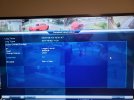
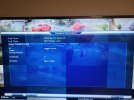
Update 2 hours ago: Again, I turned on the monitor, and it was on channel 1 cam instead of the camera overview screen. So, I decided to check the log - it was cleared. Interesting.

I rebooted the NVR and viewed the log. This time it showed all the events associated with the reboot of the NVR. Checked the log and details carefully. All but one camera showed as logged local with no user or group. Curiously, camera 10 shows as logged local, user: default, User Group for the login/initialization. It's the only camera that shows a user and group
 

Attachments

  • Log1.jpg
    Log1.jpg
    213.6 KB · Views: 2
  • Log2.jpg
    Log2.jpg
    209.5 KB · Views: 2