Does anyone know how to recover an Axis camera that is blinking red and does not get assigned an IP on the network?

Arjun

IPCT Contributor
Feb 26, 2017
14,645
16,748
The Free? World
Does anyone know how to recover an Axis camera that is blinking red and does not get assigned an IP on the network?
I can't seem to access recovery mode to reload the firmware. Seems like a permanently bricked device to me.
 
Page 7 of the manual...

LED Indicators
Note
• The Status LED can be configured to flash while an event is active.
• The Status LED can be configured to flash for identifying the unit. Go to Setup > System Options > Maintenance.
Status LED Indication
Unlit Connection and normal operation.
Green Shows steady green for 10 seconds for normal operation after startup completed.
Amber Steady during startup. Flashes during firmware upgrade.
Amber/Red Flashes amber/red if network connection is unavailable or lost.
Red Flashes red for firmware upgrade failure.
 
Page 7 of the manual...

LED Indicators
Note
• The Status LED can be configured to flash while an event is active.
• The Status LED can be configured to flash for identifying the unit. Go to Setup > System Options > Maintenance.
Status LED Indication
Unlit Connection and normal operation.
Green Shows steady green for 10 seconds for normal operation after startup completed.
Amber Steady during startup. Flashes during firmware upgrade.
Amber/Red Flashes amber/red if network connection is unavailable or lost.
Red Flashes red for firmware upgrade failure.
Pretty sure its bricked due to a firmware upgrade failure

Not sure how to recover it
 
Pretty sure its bricked due to a firmware upgrade failure

Not sure how to recover it
Disassemble it, look for three or four pin serial console port.
Connect USB-to-TTL cable for GND, TXD, and RXD (no Vcc)
Open PuTTY session to COMx: serial port at 19200, 8N1
Hope for readable output. If not, try 115200, 8N1.
Copy and post output here.
It's probably stuck in U-Boot, looking for a TFTP server.

If all that is too much trouble, DM me for a mailing address and I'll do it for you.
I'm already about to do this for a Loryta/EmpireTech IPC-T221R-ZAS S3 camera tomorrow.
 
Have you try to press and hold the reset button for 30 seconds while powering up the camera?
I tried that for 15 seconds or so, even popped off the cover and saw two reset buttons, which was odd

I tried using command prompt to access the camera's recovery mode, but even then it was no go
 
Disassemble it, look for three or four pin serial console port.
Connect USB-to-TTL cable for GND, TXD, and RXD (no Vcc)
Open PuTTY session to COMx: serial port at 19200, 8N1
Hope for readable output. If not, try 115200, 8N1.
Copy and post output here.
It's probably stuck in U-Boot, looking for a TFTP server.

If all that is too much trouble, DM me for a mailing address and I'll do it for you.
I'm already about to do this for a Loryta/EmpireTech IPC-T221R-ZAS S3 camera tomorrow.
Thank you @VorlonFrog
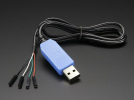
Just to confirm, you are referring to this cable right?
1783005791548.png
 
26EBDC83-DBE9-4690-8AF3-72F00578EC10.jpeg467D2EB3-BEE8-43CD-9ED8-C11AF23AE049.jpeg


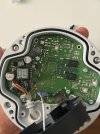
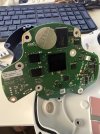
Unfortunately, no pins to connect a USB-to-TTL cable
 
Its too bad replacing that coin-size battery won't help remedy the problem.
This would have a been a very cheap way to get a panoramic camera, only costed me $20 bucks lol

The Dahua one does not work well in Blue Iris - no way to dewarp. Worked best as a standalone camera, but never really liked how it was put together by Dahua.
 
View attachment 245785View attachment 245784


Unfortunately, no pins to connect a USB-to-TTL cable
It's that row of four vias with one square via and three round vias., Right side of first photo, left side of second photo. Square via is LIKELY ground, check with a meter to identify GROUND first. TXD and RXD are the center two vias, and 3v3/Vcc is the outside round via. The way to identify RXD vs TXD is to hook 'em up one way, and if you get NOTHING output in PuTTY session, swap 'em. Remember to NOT connect anything to the 3vc/Vcc via.
 
  • Like
Reactions: Arjun