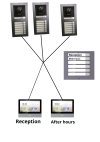
Since you have 2 buttons only, wouldnt it be better if you went with DS-KV8213-WME1? Nevertheles here is how you will configure those
Door station A will be Door No. 0 - Meaning this is main
Door station B will be Door No. 1 - Meaning its first Subdoor Station
Door station C will be Door No. 2 - Meaning its second Subdoor Station
In both indoor stations you navigate to Network Settings -> Group network settings
1st undoor it remains unchanged except (Main) Door Station ip address, you enter the Door station A ip address, and write registration password
2nd indoor station you change Room number to 2, and enter under (Main) door station ip address ofr door station A as well, and write registration password
Inside Doorstation A under Intercom -> Press Button to call -> Assign 1 and 2 to any keys you would preffer (also has to be changed inside B and C)
Inside door station B once you changed to 1 it will reboot, once rebooted navigate to Intercom tab- > Session settings -> Enter Main Door Station A ip address and confirm with registration password
Inside door station C once you changed to 2 it will reboot, once rebooted navigate to Intercom tab -> Session settings -> Enter Main Door Station A ip address and confirm with registration password
Once you did all this go again to Door station A and under devices you should see 2 indoor station + 2 subdoor stations B and C online
After that its all finesse, lock time, time and date sync, language and so on.
Good luck!