Hikvision DVR "Upgrading failed"

Th3Xtr3m3

n3wb
Oct 2, 2023
9
0
SA
HI ALL

I have a iDS-7208HQHI-M2/S - Current Firmware (V4.26.011 build 201109) .. i am having issues where i need to reset the config every couple of months to get the Intrusion detection triggers to fucntion, hence wanting to try update the firmware.
  • I searched on Hikvision website and when i search for my device model .. nothing is found ....
  • when i google my model i get to a page iDS-7208HQHI-M2/S that shows firmare and release notes , i check the release notes and confim my exact mode is in the supported list ...
  • trying to update the DVR from GUI or IVMS results in a failed upgrade with "Upgrading failed" when trying to upgrade to Firmware__V4.75.011_240625_S3000582857

1. am i doing the upgrade correct ?
2. I procured mine in South Africa , but cant find this version on the regional download list the ony one i see is for Europe , could that be teh mismatch ?
 
Upgrade via BatchConfiguration Tool. Or run web interface via IE and plugin and then try to upgrade.

Does your DVR in SADP toolshows WR(World Region) in the long serial?
 
Ive tried batchconfiguration tool , it failed as well leaving me thinking that the file is not compatibel

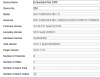
Serial : iDS-7208HQHI-M2/S0820210426CCWRF74179996WCVU
 
nope IE mode in Edge and IE plugin on Chorme has the same issue "Upgrading failed."

steps taken
  • google "iDS-7208HQHI-M2 firmware"
  • open iDS-7208HQHI-M2/S
  • download "Firmware_Europe_V4.75.011_240625"
  • file Firmware__V4.75.011_240625_S3000582857.zip is downlaoded
  • unzip file and put digicap.dav in seperate folder with confirmed r/w acces
  • logon to DVR via GUI using admin account
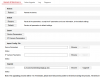
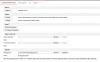
  • navigate to System/Maintenance
  • Upgrade - browse for digicap.dav file , and press Upgrade
  • confirm tro proceed
  • Progress bar stays at 0% in Chrome , in IE tab it times out after a period giving the "Upgrading failed." error

so what am i doing wrong :)
 
Thats not working either .. is there a way i can enable debug logging to see what the actual error is aka is it a firmware mismatch or is there a probelm with my deivce or any better clues
 
Well, there is , running ssh and then debug command. But sadly you would neeed someone from hikvision to generate you password to enter debug.


If i were on your place, i'd probably flash it using serial cable. But well i can survive bricking few of those :)
 
V4.26.011 build 201109 is the latest available firmware on that hardware revision as that particular hardware build is EOL, which is why the update keeps failing (they build in a hardware match failsafe to prevent uninformed people to brick units). There is newer firmware for newer hardware builds, but those are not compatible. Intrusion detection on a DVR? Waste of money, it's like buying a kit car Ferrari and complaining about the performance. Then there is the security advisory from Hikvision- CVE-2021-36260. If you have a half decent firewall on your router this is nothing to worry about. So how I see is you have two options: 1- Live with it. 2- Take 240V AC and connect it directly to the 12V DC Input on the machine and file an insurance claim to replace your kit car Ferrari with the newer model kit car...
 
its not that i am using its soley for IDS its just a great detterent to make my property more avoidavle that the neighbour ...when it works it works well and only detects humans , but the config resets evey couple of months and thats with no reboot nothing.

NOTE: i know someone that is running 4.75 on this exact model but i am unable to source the model . .and yes , i am fine if i accidentilly brick the unit thats a risk i am willing to take.

Unit:
  • Model: iDS-7208HQHI-M2/S (C / K20A8)
  • Serial: iDS-7208HQHI-M2/S0820210426CCWXXXXXXXXX6WCVU (WR region)
  • MAC: 08-a1-xx-xx-xx-xx
  • Current firmware: V4.26.011 build 201109 (November 2020 — now ~4 years old)
  • HW: 0x20e8300 | DSP V5.0 build 200918 | HMS V2.3.1 | FD V4.3.0


Operational defects on current firmware:
  • AcuSense human/vehicle detection and intrusion zoning are unreliable — detection and zone triggers intermittently stop functioning.
  • Configuration does not persist — settings (notably the intrusion-detection configuration) revert, requiring periodic manual reconfiguration to restore function.
These are stability defects on a four-year-old firmware build. The standard remediation is to update to the current released firmware (V4.75.013 build 240919), which is the latest version Hikvision publishes for this exact model.

The blocker:
The official V4.75.013 build from the public Hikvision US portal — whose release notes explicitly list iDS-7208HQHI-M2/S(STD)(C) — was flashed locally via USB and rejected by the unit with "firmware mismatch." Model and hardware are confirmed correct, so this is a region-property mismatch: my WR unit requires a region-matched build that is not published on the public portals. The V4.75.013 release notes confirm Hikvision maintains many region/distributor-specific builds of this firmware.
 
Quality kitchen tools make every meal preparation easier and more enjoyable. Whether you're cooking at home or in a professional setting, choosing the right knife is essential. Our Culinary Kitchen Knives are crafted with premium materials to deliver excellent sharpness, precision, and durability. Designed for comfort and reliable performance, they help you achieve clean, effortless cuts every time.
 
Your information on your own machine is incorrect, you have the incorrect hardware build info, your machine has the following hardware build: iDS-7208HQHI-M2/S(STD)/8A+8/4ALM (K8A4) and not iDS-7208HQHI-M2/S (C / K20A8) The K8A4 only supports up to V4.26.010_Build_200923. I know this as I have Back End Access to the Hardware Revisions as allocated to the SN's on the Units. Your SN is in the screenshot of post #10. OEM will not write new firmware for a obsolete hardware that is EOL and Discontinued. By the way, Your warranty has also expired on this unit.