IPC-T22IR-ZAS-S3 - Cannot update from V2.840.0000000.17.R to latest .22.R version

Aug 3, 2015
5,638
20,698
Land of the free
v17.R is the firmware that was delivered with this camera, and I've never had any reason to update/upgrade the firmware, until today. Unfortunately, it is impossible to directly update from v17 to v22. Is there any archive of the intermediate firmware versions available? I suspect I'll need to go through the sequence until the latest update will apply successfully. Thank you in advance!!
 
aging @EMPIRETECANDY - Have you any firmware files for this camera? Thank you, sir. :)


I'm searching the DahuaWiki URL Index of /images/Files/Firmware but not certain which platform.
Since I cannot attach a JPG/PNG image file of the current T221R camera ID information, I'm including it below:

Device TypeIPC-T22IR-ZAS-S3
System VersionV2.840.0000000.17.R, Build Date: 2024-08-14
WEB VersionV3.2.1.2003370
ONVIF Version22.06(V2.0.1.107423)
Serial NumberAK03C15PAGxxxxx
Algorithm Version4.7.13
Security BaselineV2.3
Copyright2024


Device Type IPC-T22IR-ZAS-S3
System Version V2.840.0000000.17.R, Build Date: 2024-08-14
WEB Version V3.2.1.2003370
ONVIF Version 22.06(V2.0.1.107423)
S/N AK03C15PAGxxxxx
Algorithm Version 4.7.13
Security Baseline Version V2.3
Copyright 2024, all rights reserved.


The API / CGI command/URL that is not operating properly is shown below:
The firmware fails to respond in any way, eventually yielding a 401 error.
:(
The URL struck-through above was what Scrypted included in its log file. I suspect it's not the literal URL being sent to the camera. What I did find in the Scrypted source code for the Amcrest plugin (also used for Dahua) was where they query the camera, and this URL actually succeeded with the camera.
http://192.168.1.76/cgi-bin/magicBox.cgi?action=getSystemInfo
It returned the following:

serialNumber=AK03C15PAGxxxxx deviceType=IPC-T22IR-ZAS-S3 processor=NT98566 cardReader=false ProductDate=none hasRTC=true SyncTime.Strategy=None cameraNum=0 2DCode=none

I have double-checked the ONVIF username and password and authorities are setup correctly.
FYI, I'm using the Scrypted (v0.143.0) software to present my EmpireTech IP cameras as HomeKit devices

 
Last edited:
If it worked previously and now is not, it is likely a corrupted firmware.

Have you tried a factory reset?
 
Buddy, send me DM of the SN, i will check the firmware if good, will send you the correct one.
 
If it worked previously and now is not, it is likely a corrupted firmware.

Have you tried a factory reset?
Honestly, I would not know if it ever worked, previously. :rolleyes:
Just trying to get things setup with Scrypted and HomeKit this weekend.
Also, this was a 'spare' camera from two years ago, so it sat in the box until several months ago.
RTSP video output to Blue Iris has never been any issue.
 
  • Like
Reactions: EMPIRETECANDY
Started digging into the Scrypted source code for the Amcrest plug-in, and manually tested all five of the CGI API calls it's making during configuration:

/cgi-bin/devAudioOutput.cgi?action=getCollect
/cgi-bin/encode.cgi?action=getConfigCaps&channel=1
/cgi-bin/configManager.cgi?action=getConfig&name=VideoStandard
/cgi-bin/magicBox.cgi?action=getProductDefinition&name=MaxExtraStream
/cgi-bin/configManager.cgi?action=getConfig&name=Encode

Every API call succeeded from the web browser and returned valid data.
But every API call is also requiring Username and Password submission.
I'll definitely have to check with the Scrypted developer for this plug-in, and see if he can provide more detailed debug logging capabilities.
I suspect some API call somewhere in the plug-in code may not be including the credentials, and it should.
 
Also found this thread, right here at this IPCamTalk forum:

I strongly suspect the two cameras I previously purchased were originally loaded with some 'hybrid' firmware V.17 from the factory. Whether that was Dahua or Loryta or EmpireTech, it doesn't really matter. The V.17 firmware will not accept any of the Molec, Taurus, or Taylor firmware families. It just rejects them as soon as they upload, and reboots. V.17 firmware works well enough for RTSP video, and appears to be operational for CGI-BIN API calls, but something about it just isn't baked together as nicely as it should be. Whether using the cameras web GUI, or ConfigTool, or even SmartPSS, it rejects any and all firmware update files submitted.

I opened my spare of this camera this morning, and couldn't find any TTL/console/serial port points to attach. After I found out how old and incapable was the 2019 firmware, I pulled the camera further apart and located the four-via console port. Now if only I could find my USB-to-TTL cable and multi-meter. Found those, now just how danged SMALL are those J5 vias/pins?!? I don't have any pin headers that small at home. :banghead: I'm guessing they are 1.27 mm. Guess I'll find out when those arrive.
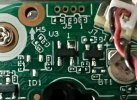
IMG_5746.jpeg

Holy Crap!! The remaining spare/sibling camera has even OLDER firmware (see below)
This relatively ancient firmware will not even upload ANY firmware file, much less accept it.

System VersionV2.800.0000000.3.R, Build Date: 2019-08-16
WEB VersionV3.2.1.775447
ONVIF Version18.06(V2.4.5.698080)
Serial Number5J11I1HGFxxxxx
Algorithm Version1.0.0
Security Baseline VersionV2.0
 
Last edited: