
This is a DB1 running stock firmware v5.2.4 build 230404. I picked up an Electronic Chime this weekend to try. I believe this is a discontinued product, but a Canada Computers had an open box unit for sale.
New RCA HSDB2A 3MP Doorbell IP Camera
- Thread starter fleece
- Start date
You are using an out of date browser. It may not display this or other websites correctly.
You should upgrade or use an alternative browser.
You should upgrade or use an alternative browser.

ArbitaryTwist
n3wb
Where do you get a power kit ? I lost mine when i moved so looking for one.May need a power kit.

I went back and searched our Doorbell 101 and in our TROUBLESHOOTING TIPS: I found this:Where do you get a power kit ? I lost mine when i moved so looking for one.
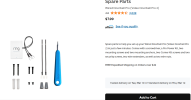
⦁ If your Chime has suddenly stopped working (2020) - TechBill, TechBill - misally (If you suspect your Power Kit is the reason your Chime is not working, here is a Power Kit replacement thanks to hibby50 )
Spare Parts (for Wired Doorbell Pro (Video Doorbell Pro 2))
HTH
As an Amazon Associate IPCamTalk earns from qualifying purchases.
I have had the hikvision DS-HD1 for quite a few years. Never messed with updates. Isolated from the internet and used with zoneminder. Recently found my mechanical chime doesn't work but the video stream works. My IR cover cracked long ago but it is pretty well protected on the porch. I read the links about the chime stopping and all seem to be related to firmware update which I have never done. Noted it runs hot, especially the back side. It is in the shade on a 90F day and I measured 132F on the back when I pulled it off for some testing. The chime works when I short the wires like a traditional doorbell button would do. Since the camera works I am guessing the power kit block is working and unsure how to test it. I have some equipment and some tech experience but unsure how it operates. Thinking it may be time to just replace it so need to read up on available cameras. Don't need the motion detection.
ArbitaryTwist
n3wb
Check the APP settings there should be an option for Mechanical chime. I had a lot of disconnection issue and i udpated to the latest firmware with SADP and it seems solid. Also i ordered the Ring Chime Kit and the buzz issue i had went away.I have had the hikvision DS-HD1 for quite a few years. Never messed with updates. Isolated from the internet and used with zoneminder. Recently found my mechanical chime doesn't work but the video stream works. My IR cover cracked long ago but it is pretty well protected on the porch. I read the links about the chime stopping and all seem to be related to firmware update which I have never done. Noted it runs hot, especially the back side. It is in the shade on a 90F day and I measured 132F on the back when I pulled it off for some testing. The chime works when I short the wires like a traditional doorbell button would do. Since the camera works I am guessing the power kit block is working and unsure how to test it. I have some equipment and some tech experience but unsure how it operates. Thinking it may be time to just replace it so need to read up on available cameras. Don't need the motion detection.
So all working well in my opinion. Before the firmware update, i had lots of disconnection issues.
Do you use an App to communicate to it? Try Guarding Vision App, it should allow you to pick Chime type...I have had the hikvision DS-HD1 for quite a few years. Never messed with updates. Isolated from the internet and used with zoneminder. Recently found my mechanical chime doesn't work but the video stream works. My IR cover cracked long ago but it is pretty well protected on the porch. I read the links about the chime stopping and all seem to be related to firmware update which I have never done. Noted it runs hot, especially the back side. It is in the shade on a 90F day and I measured 132F on the back when I pulled it off for some testing. The chime works when I short the wires like a traditional doorbell button would do. Since the camera works I am guessing the power kit block is working and unsure how to test it. I have some equipment and some tech experience but unsure how it operates. Thinking it may be time to just replace it so need to read up on available cameras. Don't need the motion detection.

Guarding Vision - Apps on Google Play
Guarding Vision is a video surveillance software

Guarding Vision App - App Store
Download Guarding Vision by 明军 顾 on the App Store. See screenshots, ratings and reviews, user tips, and more apps like Guarding Vision.
 apps.apple.com

@JimLS
Nice to see you on this forum. When I had this issue I would just install the Guarding Vision app and re-enable the chime then remove the app.
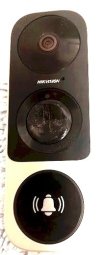
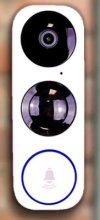
Here I recently replaced the old Nelly NSC-DB2 NDB313-W DS-HD1 because of a cracked PIR sensor with a new still in box EZViz DB1, updated firmware to Hikvision so that ONVIF worked and all is well now. Still runs hot.
Nice to see you on this forum. When I had this issue I would just install the Guarding Vision app and re-enable the chime then remove the app.
Here I recently replaced the old Nelly NSC-DB2 NDB313-W DS-HD1 because of a cracked PIR sensor with a new still in box EZViz DB1, updated firmware to Hikvision so that ONVIF worked and all is well now. Still runs hot.
Last edited:
Hi Pete! A couple other details... The unit makes a chime sound when the button is pressed but only seems to do it once and no trigger of mechanical chime - seems like that might not be working right but just a guess. Wondering if it runs hot because it is continuously streaming video. When I had it off the mounting base I observed I could put a thin aluminum sheet behind the unit to help heatsink and lower the temp - just need a couple holes for wires and screws. I have some flashing in various colors so might try that. Maybe bend the sides back to conform to the base. I know that the parts can run at much higher temps that 130F but if the plastic case is that hot the parts inside are much hotter. My IR dome is in worse shape than yours (it gets direct sun in the winter when sun is low) and thinking of just putting a disk over it with glue - I don't use the IR. Are you using the app to get alerts? I suppose I could give it internet access for this and still record the video? Just curious as without the IR that won't work anyway. Have a graphics board so could set that up to do better motion analysis with zoneminder but haven't looked into that much. Will give the app a try.
I had my Hikvision LaView DB for 3+ years, it was not in direct sunlight but temps outside were 100 at times during the Summer. It ran 130F also but still worked fine. I had the same concern as others here. Never hurts to try to get it to run cooler but it is not a problem.
The unit makes a chime sound when the button is pressed but only seems to do it once and no trigger of mechanical chime - seems like that might not be working right but just a guess.
Yes the DB2 that I replaced also would misbehave when pressing the doorbell button. Sometimes getting stuck in ring mode. In the old house used an Elk debounce board to time the button press.
Wondering if it runs hot because it is continuously streaming video.
Mine always ran hot streaming to HA, OmniPro Touchscreens and Zoneminder. I did add an HA RTSP proxy server.
Are you using the app to get alerts?
No. Removed app. No one rings the doorbell anyhow. Added a wireless PIR facing the door which works well. HA also sees motion via onvif.
The outdoor PIR does the best for motion detection. In the old house used cameras with built in PIR's.
Yes the DB2 that I replaced also would misbehave when pressing the doorbell button. Sometimes getting stuck in ring mode. In the old house used an Elk debounce board to time the button press.
New Hikvision Doorbell to Elk 960 and Current sensing switch
Here just replaced doorbell with same Hikvision model (Thank you David!!!)Wondering if it runs hot because it is continuously streaming video.
Mine always ran hot streaming to HA, OmniPro Touchscreens and Zoneminder. I did add an HA RTSP proxy server.
Are you using the app to get alerts?
No. Removed app. No one rings the doorbell anyhow. Added a wireless PIR facing the door which works well. HA also sees motion via onvif.
The outdoor PIR does the best for motion detection. In the old house used cameras with built in PIR's.
What wireless PIR are you using? I though about putting a wired PIR on the ceiling of the porch. I could route the wire through the attic.The unit makes a chime sound when the button is pressed but only seems to do it once and no trigger of mechanical chime - seems like that might not be working right but just a guess.
Yes the DB2 that I replaced also would misbehave when pressing the doorbell button. Sometimes getting stuck in ring mode. In the old house used an Elk debounce board to time the button press.
New Hikvision Doorbell to Elk 960 and Current sensing switch
Here just replaced doorbell with same Hikvision model (Thank you David!!!)
Wondering if it runs hot because it is continuously streaming video.
Mine always ran hot streaming to HA, OmniPro Touchscreens and Zoneminder. I did add an HA RTSP proxy server.
Are you using the app to get alerts?
No. Removed app. No one rings the doorbell anyhow. Added a wireless PIR facing the door which works well. HA also sees motion via onvif.
The outdoor PIR does the best for motion detection. In the old house used cameras with built in PIR's.
Been using wireless 433Mhz sensors connected to the Tasmota (Sonoff) wireless hub for a couple of years now. Batteries last over a year and personally works better than Zigbee / ZWave wireless sensors. (Have those too).
KERUI 433MHz Safety Driveway Patrol Infrared Wireless Intelligent PIR Motion Detector
Still use wired sensors for the OmniPro 2 panel.
KERUI 433MHz Safety Driveway Patrol Infrared Wireless Intelligent PIR Motion Detector
Still use wired sensors for the OmniPro 2 panel.
As an Amazon Associate IPCamTalk earns from qualifying purchases.
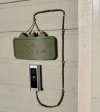
Installing doorbell cam to deter visitors... am I doing this correctly?


noparking247
n3wb
Hello,
I figured I'd provide a bit of an update.
I (finally) installed the RCA unit I mentioned 2-3 pages ago. It was to be installed into a brick wall, with short leads, and I didn't want to drill another hole -- so, I had designed a 3D bracket (using ChatGPT). If there's any interest, I can upload it for others (although I'm sure at this point the demand is quite small).
The installation was fairly seamless -- I removed the old, mounted the adapter, mount, connected the clips with wire nuts, connected the clips to the doorbell, mounted doorbell to mount, installed faceplate, and sealed all around it (terribly, as brick is not uniform/flush -- but I tried).
I removed the old transformer and used an 16.5V 40VA plug-in transformer I found on eBay.
I made the connections in the door chime, plugged it all back in -- camera booted right up and I confirmed it was operational using the "Guarding Vision" app. Everything worked perfect -- except for the door chime. I entered into Guarding Vision multiple times, selected mechanical chime, unselected, re-selected, rebooted, opened/closed app, etc. -- nothing I did seemed to make it work. However, once I calmed down and learned how to read again, I stumbled on a comment that there is a battery of some sorts within the doorbell itself. This needs to trickle charge for 3+ hours to ensure the mechanical chimes are able to trigger.
I figured it's 50/50 -- who knows how long this RCA had been sitting, discharged, in a box somewhere in the USA waiting for me -- maybe it's shot? Maybe it'll work? No clue.
I'm happy to report, it did in fact work! So anyone else who happens to read this, patience is a virtue.
This did however get me thinking -- if there is a small battery inside the unit, has anyone actually successfully replaced this? Or is the norm just "replace it with something else when it dies"?
Thank-you everyone!
I figured I'd provide a bit of an update.
I (finally) installed the RCA unit I mentioned 2-3 pages ago. It was to be installed into a brick wall, with short leads, and I didn't want to drill another hole -- so, I had designed a 3D bracket (using ChatGPT). If there's any interest, I can upload it for others (although I'm sure at this point the demand is quite small).
The installation was fairly seamless -- I removed the old, mounted the adapter, mount, connected the clips with wire nuts, connected the clips to the doorbell, mounted doorbell to mount, installed faceplate, and sealed all around it (terribly, as brick is not uniform/flush -- but I tried).
I removed the old transformer and used an 16.5V 40VA plug-in transformer I found on eBay.
I made the connections in the door chime, plugged it all back in -- camera booted right up and I confirmed it was operational using the "Guarding Vision" app. Everything worked perfect -- except for the door chime. I entered into Guarding Vision multiple times, selected mechanical chime, unselected, re-selected, rebooted, opened/closed app, etc. -- nothing I did seemed to make it work. However, once I calmed down and learned how to read again, I stumbled on a comment that there is a battery of some sorts within the doorbell itself. This needs to trickle charge for 3+ hours to ensure the mechanical chimes are able to trigger.
I figured it's 50/50 -- who knows how long this RCA had been sitting, discharged, in a box somewhere in the USA waiting for me -- maybe it's shot? Maybe it'll work? No clue.
I'm happy to report, it did in fact work! So anyone else who happens to read this, patience is a virtue.
This did however get me thinking -- if there is a small battery inside the unit, has anyone actually successfully replaced this? Or is the norm just "replace it with something else when it dies"?
Thank-you everyone!
Glad you got er working...Hello,
I figured I'd provide a bit of an update.
I (finally) installed the RCA unit I mentioned 2-3 pages ago. It was to be installed into a brick wall, with short leads, and I didn't want to drill another hole -- so, I had designed a 3D bracket (using ChatGPT). If there's any interest, I can upload it for others (although I'm sure at this point the demand is quite small).
The installation was fairly seamless -- I removed the old, mounted the adapter, mount, connected the clips with wire nuts, connected the clips to the doorbell, mounted doorbell to mount, installed faceplate, and sealed all around it (terribly, as brick is not uniform/flush -- but I tried).
I removed the old transformer and used an 16.5V 40VA plug-in transformer I found on eBay.
I made the connections in the door chime, plugged it all back in -- camera booted right up and I confirmed it was operational using the "Guarding Vision" app. Everything worked perfect -- except for the door chime. I entered into Guarding Vision multiple times, selected mechanical chime, unselected, re-selected, rebooted, opened/closed app, etc. -- nothing I did seemed to make it work. However, once I calmed down and learned how to read again, I stumbled on a comment that there is a battery of some sorts within the doorbell itself. This needs to trickle charge for 3+ hours to ensure the mechanical chimes are able to trigger.
I figured it's 50/50 -- who knows how long this RCA had been sitting, discharged, in a box somewhere in the USA waiting for me -- maybe it's shot? Maybe it'll work? No clue.
I'm happy to report, it did in fact work! So anyone else who happens to read this, patience is a virtue.
This did however get me thinking -- if there is a small battery inside the unit, has anyone actually successfully replaced this? Or is the norm just "replace it with something else when it dies"?
Thank-you everyone!
Yes, there are several post in this Thread about battery replacements.
noparking247
n3wb
I can say I have read of successful replacements here. If it were me, I would not do anything until I had to. But being proactive is never a bad thing too...Thank-you David! Has it actually been successfully done before? Everything I read basically said "lol good luck"
noparking247
n3wb
Apologies if this is redundant, but I saw on the 101 a blurb about the RCA overlay image -- more specifically, to remove it, flash EZVIZ Build 190708, then LaView's firmware (I'm guessing latest, 190716).
My question is -- could I just flash from RCA Build 190124 direct to Hikvision Build 200321? Would that also disable the overlay?
I feel like hopping over additional unrelated builds, to ultimately (ideally) end up on Hikvision is asking for trouble.
My question is -- could I just flash from RCA Build 190124 direct to Hikvision Build 200321? Would that also disable the overlay?
I feel like hopping over additional unrelated builds, to ultimately (ideally) end up on Hikvision is asking for trouble.
Not sure about the RCA build. I use the Hikvision Build 200321 and do not see any overlay. Years now with no issues.