

Google chrome notified me that my NVR password was part of a data breach. (yippee) It was stupid simple and 6 years old. It was the same PWD I had taped to the bottom/front of the NVR's and DVr's at the Condo job.
and that system was taken over by another Mgmnt company.
Blue Iris runs thru a Tailscale VPN, so that wasn't affected. ( maybe/perhaps)
So I took the plunge, and went into Account and modify password, and it asked me ( in a never experienced menu pop-up) if I wanted to transfer the new password to other devices.
I thought this might work for some of them. So i did. The green light / Red light status in the NVR indicated all but two made the switch.
Some how even after a reboot of the NVR, two of them were stubborn. So i went into a couple cams ( amcrest 1179EW's) and manually updated the PWD.
Blue iris showed some dropped out cameras. but not all.
So I painstakingly went thru the Find/inspect with ALL the cams using the New PWD. I even plugged in the shelved Z-12's just to keep them current.
I started noticing a drop in CPU %age somewhere thru the process.
I don't know why exactly, but I'm thinking maybe because it was originally configured thru the 8Ch NVR POE and then Migrated to a 16 CH NVR, and then to an external POE switch.
Maybe I knocked some cobwebs out of the thing.
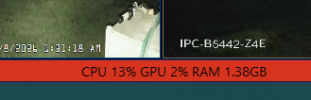
But im running 9-14% and 1-2% GPU, and 2GB ram, whereas before it was common to see 33% +or- 10%.
But now I see I'm getting a Shit ton of Get Events Errors 8000ffff on 4 cams.
So I played around with IVS and 1 fixed itself. but the other 3 I had to turn off Get ONVIF events to make the crazy yellow Diamond alerts to go away on the console views.
Time for bed.
and that system was taken over by another Mgmnt company.
Blue Iris runs thru a Tailscale VPN, so that wasn't affected. ( maybe/perhaps)
So I took the plunge, and went into Account and modify password, and it asked me ( in a never experienced menu pop-up) if I wanted to transfer the new password to other devices.
I thought this might work for some of them. So i did. The green light / Red light status in the NVR indicated all but two made the switch.
Some how even after a reboot of the NVR, two of them were stubborn. So i went into a couple cams ( amcrest 1179EW's) and manually updated the PWD.
Blue iris showed some dropped out cameras. but not all.
So I painstakingly went thru the Find/inspect with ALL the cams using the New PWD. I even plugged in the shelved Z-12's just to keep them current.
I started noticing a drop in CPU %age somewhere thru the process.
I don't know why exactly, but I'm thinking maybe because it was originally configured thru the 8Ch NVR POE and then Migrated to a 16 CH NVR, and then to an external POE switch.
Maybe I knocked some cobwebs out of the thing.
But im running 9-14% and 1-2% GPU, and 2GB ram, whereas before it was common to see 33% +or- 10%.
But now I see I'm getting a Shit ton of Get Events Errors 8000ffff on 4 cams.
So I played around with IVS and 1 fixed itself. but the other 3 I had to turn off Get ONVIF events to make the crazy yellow Diamond alerts to go away on the console views.
Time for bed.
