

I spend a fair amount of time doing Windows network configuration and I've got a few nitpicks about the built-in interfaces in Windows. I think anyone would be frustrated after locking themselves out multiple times from a remote machine because you changed it from DHCP to static addressing and Windows failed to save the Default Gateway.
I've been wanting something better for years, but never wanted to dedicate much time to building it. Claude Fable 5 is currently available in my Claude Pro subscription, so I used it to start a little open-source program that can do my most common network configuration and diagnostic tasks all in one app. This is a program I intend to use and improve a lot in the upcoming months and years, so the rough edges will get smoothed out.
Here's the project on github:

 github.com
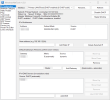
A picture is worth 1000 words, so here are screenshots of some of the more interesting tools in the program as of version 1.3. This should give you a good idea of what I am trying to accomplish.
IP Configuration tool:
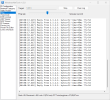
Ping and Traceroute tools:
(these are, in my opinion, an upgrade from Windows' built-in ping and tracert command-line tools!)
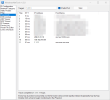
IP Scanner:
(it is very fast)
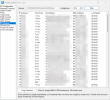
Device List:
This is a somewhat experimental tool that aggregates data from ARP (Address Resolution Protocol), NDP (Neighbor Discovery Protocol), and an IPv4 IP scan to build a device list keyed on MAC addresses.
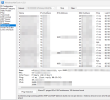
And as you can see there are several other tools in here which I haven't screenshotted above.
I've been wanting something better for years, but never wanted to dedicate much time to building it. Claude Fable 5 is currently available in my Claude Pro subscription, so I used it to start a little open-source program that can do my most common network configuration and diagnostic tasks all in one app. This is a program I intend to use and improve a lot in the upcoming months and years, so the rough edges will get smoothed out.
Here's the project on github:
GitHub - bp2008/WindowsNetTool: A Swiss Army knife of network configuration and diagnostic tools for Windows.
A Swiss Army knife of network configuration and diagnostic tools for Windows. - bp2008/WindowsNetTool
github.com
A picture is worth 1000 words, so here are screenshots of some of the more interesting tools in the program as of version 1.3. This should give you a good idea of what I am trying to accomplish.
IP Configuration tool:
Ping and Traceroute tools:
(these are, in my opinion, an upgrade from Windows' built-in ping and tracert command-line tools!)
IP Scanner:
(it is very fast)
Device List:
This is a somewhat experimental tool that aggregates data from ARP (Address Resolution Protocol), NDP (Neighbor Discovery Protocol), and an IPv4 IP scan to build a device list keyed on MAC addresses.
And as you can see there are several other tools in here which I haven't screenshotted above.
Last edited:


