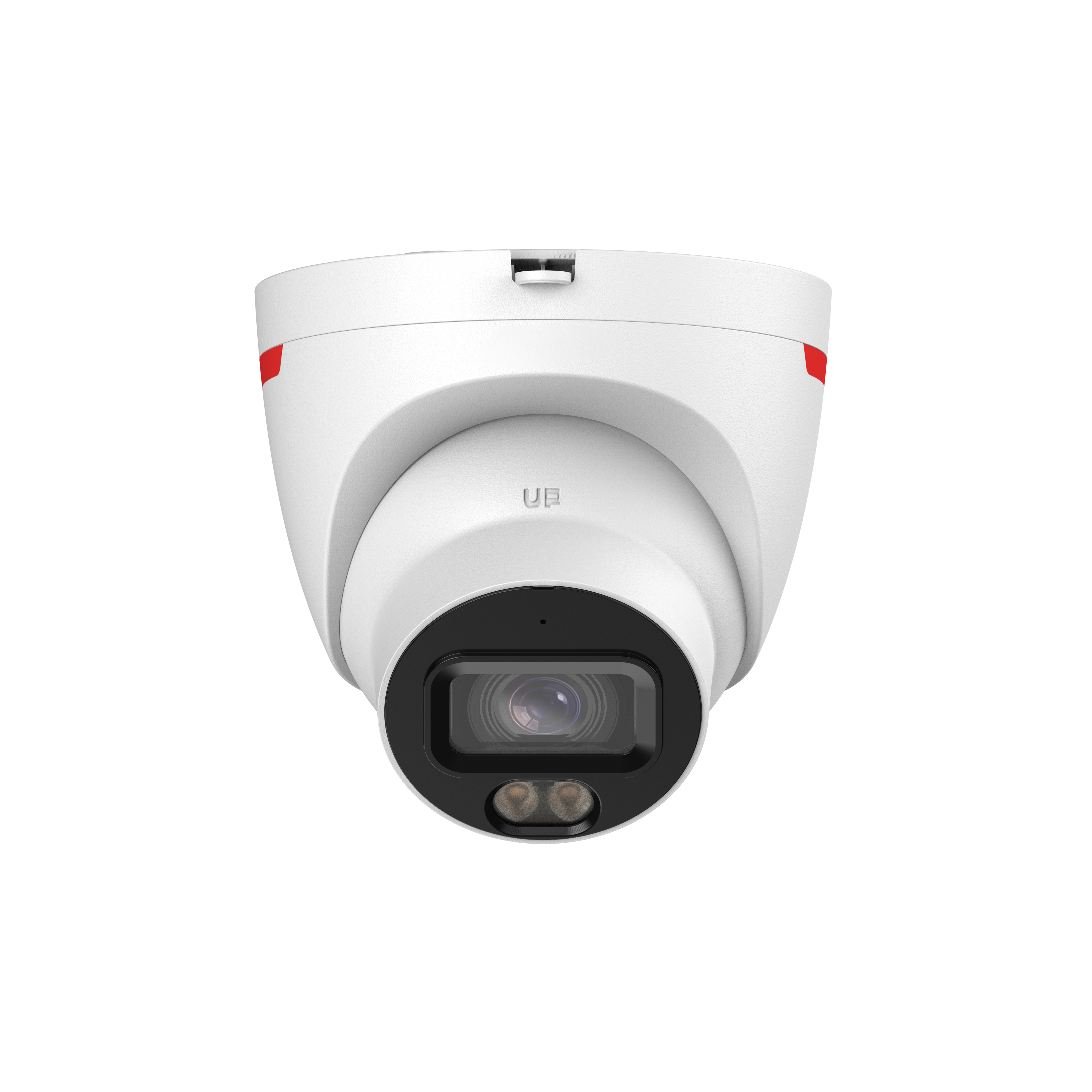
1/1.2" 8MP Varifocal

Those last 2 videos were with the other camera IRs turned ON. All the previous videos had them OFF.
I don't know how I missed that, sounds like that the G6 Pro in this case "intelligently" adjusted the shutter exposure (in your subsequent video uploads) to prevent potential "ghosting" which was obvious and noticeable in your initial upload.
 
I still want granular controls - where I can dial in settings perfectly based on my perception. I don't think it is difficult to implement unless these Ubiquiti cameras utilize a bad batch of chips, who knows what contract Ubiquiti has with their manufacturing base in China and Vietnam.
 
  • Like
Reactions: benallgood
Here's the camera as it comes to the consumer with default settings as if it would be just plugged in and not optimized. I'm going to look over the settings and light functions and do another test tomorrow night. There is a spotlight that turns on with the default settings when an AI event happens. Will like to see what just the IR does tomorrow.

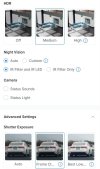
Recording set to 4K, 15FPS, Medium HDR, Night Vision set to Auto with IR filter and IR LED, Shutter Exposure set to Frame Clarity, spotlight for color night vision turned off.
Zoom is set t 1x. Adjusted position for better framing of area.

Shockingly abysmal results for a $480 camera with a whopping 1/1.2" sensor. Wow! The EmpireTech IPC-Color4K-T ($260) and EmpireTech IPC-Color4M-TL ($110) both substantially outperform this Ubiquiti G6 Pro while being 1/2 and 1/4 the price—and stay in full color mode while doing it. Part of the problem may be its F1.5-2.9 lens. Most of the cameras we're comparing it to have better F1.0-1.6 lenses. The EmpireTech IPC-T54IR-ZE camera you're comparing it with here says its lens is "F1.8 max" (I'm assuming this is at full zoom and it's something less than this at wide angle).

But what are we going to buy when Andy runs out of T54IR's ???
I may seriously consider selling some of mine one of these days—both unused stock and some already installed units to upgrade to the Color4M-TL (or the new WizColorX version of that camera once I have evaluated it). With rising prices and y'all wanting them so bad it may make economic sense...

In the previous tests, I turned off poe to the ports for any cameras that may have their IR LEDs lights visible. In this one, I wanted to see the same exact event from the perspective of each camera.


Here, we can see the substantially better nighttime performance of the EmpireTech IPC-T54IR-ZE compared to the G6 Pro. Nicely done! I noticed the G6 Pro did a slightly better job in this video than the previous ones, which is explained by you saying there are other cameras providing additional light in these clips. My only contrary observation is: The G6 Pro is definitely better at handling contrast than the 54 series camera—which despite better resolving power almost consistently washed out the license plate, even with the overexposure feature enabled (you can see it darkening the picture anytime faces/plates are present). This is one of the reasons I like the Color4M-TL camera over the 54 series cameras; it handles wide-contrast scenes much better, providing a WDR-like image without all the washout or low-contrast issues that appear on the 54 series cameras (with WDR off or on, respectively)—in addition to not suffering from as much motion blur in scenes illuminated by street/security lights keeping the camera in color mode 24/7.

 
Shockingly abysmal results for a $480 camera with a whopping 1/1.2" sensor. Wow! The EmpireTech IPC-Color4K-T ($260) and EmpireTech IPC-Color4M-TL ($110) both substantially outperform this Ubiquiti G6 Pro while being 1/2 and 1/4 the price—and stay in full color mode while doing it. Part of the problem may be its F1.5-2.9 lens. Most of the cameras we're comparing it to have better F1.0-1.6 lenses. The EmpireTech IPC-T54IR-ZE camera you're comparing it with here says its lens is "F1.8 max" (I'm assuming this is at full zoom and it's something less than this at wide angle).


I may seriously consider selling some of mine one of these days—both unused stock and some already installed units to upgrade to the Color4M-TL (or the new WizColorX version of that camera once I have evaluated it). With rising prices and y'all wanting them so bad it may make economic sense...


Here, we can see the substantially better nighttime performance of the EmpireTech IPC-T54IR-ZE compared to the G6 Pro. Nicely done! I noticed the G6 Pro did a slightly better job in this video than the previous ones, which is explained by you saying there are other cameras providing additional light in these clips. My only contrary observation is: The G6 Pro is definitely better at handling contrast than the 54 series camera—which despite better resolving power almost consistently washed out the license plate, even with the overexposure feature enabled (you can see it darkening the picture anytime faces/plates are present). This is one of the reasons I like the Color4M-TL camera over the 54 series cameras; it handles wide-contrast scenes much better, providing a WDR-like image without all the washout or low-contrast issues that appear on the 54 series cameras (with WDR off or on, respectively)—in addition to not suffering from as much motion blur in scenes illuminated by street/security lights keeping the camera in color mode 24/7.
Very good price on the TL at $109.99, wish it was Varifocal though @EMPIRETECANDY
 
  • Like
Reactions: JDreaming
@Arjun Personally, I prefer speccing out the appropriate fixed lens for each scene rather than buying varifocals, which are slower (higher F-stop) and more expensive. Speaking of the cheap Color4M-TL camera vs the classic 54IR, I recently realized that my observation of the Color4M-TL being superior in low light may be entirely due to it having a F1.0 lens versus the 54IR having a F1.6 lens. That's 2.5x as much light hitting the sensor—which is right about how much better I've been estimating that camera does in low light! Conversely, this is probably why that camera also has limited lens options; a varifocal F1.0 lens for a camera with a 1/1.8" sensor would be massive compared to the available room in these camera form factors. Put an F1.8 varifocal lens on that camera and it would lose its magic (which tells us that WizColor only helps with contrast/color management and not actual low light performance, as you have been asserting all along).

I love the better contrast management that WizColor offers (both at night and during the day), but let me remind you the Color4M-TL has weak white LEDs (with a firmware bug that limits them to about 50% with no native triggering ability in auto mode, and poor default image settings) while the 54IR has powerful IR LEDs that nobody cares if they run at 100% all the time.
 
  • Like
Reactions: JDreaming
@Arjun Personally, I prefer speccing out the appropriate fixed lens for each scene rather than buying varifocals, which are slower (higher F-stop) and more expensive. Speaking of the cheap Color4M-TL camera vs the classic 54IR, I recently realized that my observation of the Color4M-TL being superior in low light may be entirely due to it having a F1.0 lens versus the 54IR having a F1.6 lens. That's 2.5x as much light hitting the sensor—which is right about how much better I've been estimating that camera does in low light! Conversely, this is probably why that camera also has limited lens options; a varifocal F1.0 lens for a camera with a 1/1.8" sensor would be massive compared to the available room in these camera form factors. Put an F1.8 varifocal lens on that camera and it would lose its magic (which tells us that WizColor only helps with contrast/color management and not actual low light performance, as you have been asserting all along).

I love the better contrast management that WizColor offers (both at night and during the day), but let me remind you the Color4M-TL has weak white LEDs (with a firmware bug that limits them to about 50% with no native triggering ability in auto mode, and poor default image settings) while the 54IR has powerful IR LEDs that nobody cares if they run at 100% all the time.
That F1.0 aperture is going to also give a much shallower depth of field causing more areas of the scene to be out of focus. It definitely gives more light though. Tradeoffs.
 
  • Like
Reactions: JDreaming
The Color4M-TL has no IR capability .. white lights all the time at night or nothing for those not familiar
 
  • Like
Reactions: JDreaming
That F1.0 aperture is going to also give a much shallower depth of field causing more areas of the scene to be out of focus. It definitely gives more light though. Tradeoffs.
In theory yes, but I haven't noticed that on any of these cameras that I own or have installed; everything appears in focus just like with the 54IR. For those who have used the Color4K-T/X cameras, it's just like that—identical light sensitivity and F1.0 lenses. Perhaps if you got right in the camera's face, the reduced close-up focus would be noticeable, but I haven't seen it yet in real world security footage with typical subject distances. Then again, you're limited to 2.8 and 3.6mm (wide and 90°) lenses, so not much opportunity for narrow depth of field as you would with a tighter lens.

The Color4M-TL has no IR capability .. white lights all the time at night or nothing for those not familiar
Already hinted in my previous post. Although, "white lights all the time at night or nothing" isn't entirely accurate: You can use CGI commands from Blue Iris to turn the LEDs on when motion is detected and off the rest of the time, if desired (and also pull in the full 100% brightness). It doesn't take much ambient light for IVS to detect and trigger reliably, so why such functionality wasn't included natively in the camera's firmware escapes me—it would be so trivial to add and bring much additional value to the camera. The best usage scenario for these cameras is in scenes where ambient street/security lights keep the 54IR in color mode all the time at night, with grain and motion blur due to being at the edge of its low light capability. The Color4M-TL will see more clearly, with less grain, less blur, the white LEDs will stay off (in fact, by default it has to be very dark out before it turns them on), and you can set it to prevent license plate overexposure (it's clunky but quite effective at capturing plates).
 
  • Like
Reactions: Arjun and JDreaming
A few comments, about 54IR vs 54PRO vs Unifi G6/G6 PRO situation...

- reddit teardown shows that Unifi G6 cams are using 1/1.8" OmniVision sensors - exactly the same as Dahua 5842.. We don't know what 1/1.2" sensor is used in G6 PRO - but there are only 2 on the market - one from OmniVision (OS08B10) second from Sony (IMX585).. Both are not bad..

- historically, all UniFi cameras have very weak and uneven IR illumination. Ubiquiti sells additional extenders for many models that add strong IR... which is crazy - they should upgrade IR in camera, don't sell extenders to solve problem which they created...

- this comparsions shows how important is PROCESSING.. and used SOC chip. 54IR is good not only because of good image sensor and IR - but it have good image processing.

Not everyone remember - but 5442-S3 in comparison to 5442-S2 used the same image sensor and optics - but new 5442-S3 gave about 30% better night performance - both in IR and color. This was done only by change to newer SOC (chip) and using better image processing taken from Full Color cameras. I remember than Dahua in original press release for 5442-S3 once used the term: AI-ISP - which was marketing term.

But it showed that AI-ISP (some first version) was used intelligently and with great moderation in 5442-S3 - new processing that increases the brightness of the image.

The same video processing, but in a newer, more developed form with a setting for maximum image brightening (at the cost of enormous noise) is used now in the TIOC, TIOC-PRO and 54PRO cameras. With very bad results. 34PRO/54PRO problem is not created by bad sensors (because we know those sensors from Full Color cams - both in Dahua/HIK versions) but very bad execution of video processing..

Too much brightening and gamma manipulation (always HDR, which increases a noise a lot), too much combining of video frames (3D noise reduction), incorrectly set automatic shutter speed and ISO settings (based on the AI brightened image, not real one) and non-functioning manual camera settings. - typical problems with 34PRO/54PRO implementation..
 
Last edited:
A few comments, about 54IR vs 54PRO vs Unifi G6/G6 PRO situation...

- reddit teardown shows that Unifi G6 cams are using 1/1.8" OmniVision sensors - exactly the same as Dahua 5842.. We don't know what 1/1.2" sensor is used in G6 PRO - but there are only 2 on the market - one from OmniVision (OS08B10) second from Sony (IMX585).. Both are not bad..

- historically, all UniFi cameras have very weak and uneven IR illumination. Ubiquiti sells additional extenders for many models that add strong IR... which is crazy - they should upgrade IR in camera, don't sell extenders to solve problem which they created...

- this comparsions shows how important is PROCESSING.. and used SOC chip. 54IR is good not only because of good image sensor and IR - but it have good image processing.

Not everyone remember - but 5442-S3 in comparison to 5442-S2 used the same image sensor and optics - but new 5442-S3 gave about 30% better night performance - both in IR and color. This was done only by change to newer SOC (chip) and using better image processing taken from Full Color cameras. I remember than Dahua in original press release for 5442-S3 once used the term: AI-ISP - which was marketing term.

But it showed that AI-ISP (some first version) was used intelligently and with great moderation in 5442-S3 - new processing that increases the brightness of the image.

The same video processing, but in a newer, more developed form with a setting for maximum image brightening (at the cost of enormous noise) is used now in the TIOC, TIOC-PRO and 54PRO cameras. With very bad results. 34PRO/54PRO problem is not created by bad sensors (because we know those sensors from Full Color cams - both in Dahua/HIK versions) but very bad execution of video processing..

Too much brightening and gamma manipulation (always HDR, which increases a noise a lot), too much combining of video frames (3D noise reduction), incorrectly set automatic shutter speed and ISO settings (based on the AI brightened image, not real one) and non-functioning manual camera settings. - typical problems with 34PRO/54PRO implementation..


If they were using the same sensor in the 54PRO as the 5442 I can't believe at this point they havent corrected it if its just an "image processing" problem.

I (and you earlier) have it on good authority that its NOT the same sensor and indeed a cheap one due to supply/cost issues
 
  • Like
Reactions: Arjun
From what I've gathered, Ubiquiti uses the Sony STARVIS IMX485 CMOS for imaging and an Ambarella SoC for processing in the G6 Pro Turret. AI - don't quote on that.
 
  • Like
Reactions: bigredfish
If they were using the same sensor in the 54PRO as the 5442 I can't believe at this point they havent corrected it if its just an "image processing" problem.

I (and you earlier) have it on good authority that its NOT the same sensor and indeed a cheap one due to supply/cost issues

is the same sensor (or new generation of the same sensor) from SmartSense as in older FULL COLOR (nor IR) cams - so old 5449 (not sold by Andy, but available in EU) or 5849-180 (Color4K-180 from Addy shop).. Or older HikVision ColorVu 2.0 (before hybrid)..

not 5442/5842 - where is used OmniVision...

the new generation of 1/1.8" (4/6/8 Mpx) SmartSense image sensors supports IR - older sensor didn't.. so this is why we have Dual Light cams now with those sensors...

For color it has better night performance than old OmniVision used in 5442. For IR it have worse - 1/1.8" OmniVision was a king with NIR performance..

And very different noise characteristics..

One more time - problem with 34PRO/54PRO is not in sensors.. they are good.. Problem is with crazy processing - especially "Always HDR" which increases brightness (and noise) of image too much.

And can't be disabled / limited... Heavy 3D NR removes that noise for static content, but for movement new 2D NR (even with AI) is not enough..
 
is the same sensor (or new generation of the same sensor) from SmartSense as in older FULL COLOR (nor IR) cams - so old 5449 (not sold by Andy, but available in EU) or 5849-180 (Color4K-180 from Addy shop).. Or older HikVision ColorVu 2.0 (before hybrid)..

not 5442/5842 - where is used OmniVision...

the new generation of 1/1.8" (4/6/8 Mpx) SmartSense image sensors supports IR - older sensor didn't.. so this is why we have Dual Light cams now with those sensors...

For color it has better night performance than old OmniVision used in 5442. For IR it have worse - 1/1.8" OmniVision was king with NIR performance..

And very different noise characteristics..

One more time - problem with 34PRO/54PRO is not in sensors.. they are good.. Problem is with crazy processing - especially "Always HDR" which increases brightness (and noise) of image too much.

And can't be disabled / limited... Heavy 3D NR removes that noise for static content, but for movement new 2D NR (even with AI) is not enough..
woudlnt that be an easy firmware fix... to allow, or not allow the heavy 3d NR etc?
 
woudlnt that be an easy firmware fix... to allow, or not allow the heavy 3d NR etc?

yes - this should be fixable in firmware.. This is why for long time I hoped for resolution with a new firmware...

But it looks like Dahua don't want "downgrade" new bright night color performance - so they will not limit that heavy use of AlwaysHDR. Or give us back manual control over it...
 
Last edited:
Gotta' admit - the nighttime performance is slightly improved after turning off other IR LEDs from cameras in the vicinity. However, the IR in this G6 Pro Turret reminds me of older Dahua cameras before the 5231 Turret that was introduced in 2016-17.
For license plate, if you select LPR Night Vision in settings, the IR and Exposure would have auto-adjusted to get that plate reading.

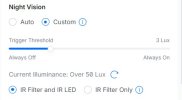
View attachment 244676 You can also try tinkering with IR controls - View attachment 244677

And for Shutter Exposure - Select Frame Clarity (somewhat granular control, but not completely) - View attachment 244678
Weird. I don't have the LPR toggle on mine. I did have the Shutter/Exposure set to "Frame Clarity" though. I tried each of those. "Frame Clarity" gave me the better results.

HDR and Shutter.jpg

When I changed to Custom under Night Vision, it just allows you to select at which Lux level you want to activate the IR Filter and/or IR Filter and LEDs.

1780943327680.jpeg