

MikeLud1
IPCT Contributor
I updated to v6.0.7.2 and lost all my camera groups. Does anyone know how to get back the groups. I did downgrade to v6.0.7.1 and the camera groups are still missing

I updated to v6.0.7.2 and lost all my camera groups. Does anyone know how to get back the groups. I did downgrade to v6.0.7.1 and the camera groups are still missing
An issue likely introduced in 6.0.5.4 where adding more than 256 cameras (possibleby deleting/importing/etc.) could cause group associations to become corrupted.This version does a re-mapping based on the “groups” list string in camerasettings—please check your group camera memberships following this update to insure they are accurate.

Might be worth checking in the Registry if the 'Groups' branch is still there ?I updated to v6.0.7.2 and lost all my camera groups. Does anyone know how to get back the groups. I did downgrade to v6.0.7.1 and the camera groups are still missing
I did and they are goneMight be worth checking in the Registry if the 'Groups' branch is still there ?
Number added under every Group registry key. Subsequent releases (6.0.5.5, 6.0.5.6, etc.) continued to change these values, which initially made me suspect BI was introducing some sort of internal group identifier.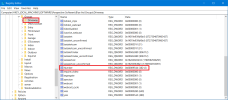
An issue likely introduced in 6.0.5.4 where adding more than 256 cameras (possible by deleting/importing/etc.) could cause group associations to become corrupted.
cameras128 added under most Group registry keys.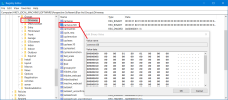
cameras (32 bytes)cameras128 (128 bytes)camlist output, it appears that group membership is represented as a bitmap indexed by the camera number values returned by the Blue Iris webserver API (identical to regkey Number mentioned above).Per-camera:
group (REG_SZ)
groups (REG_SZ)
Per-group:
cameras (REG_BINARY, 32-byte bitmap)
cameras128 (REG_BINARY, 128-byte bitmap)DriveWay-1:
group = Outdoor;Garage;Front;DW1cloneset;Driveway
groups = Outdoor;Garage;Front;DW1cloneset;Driveway
DriveWay-2:
group = Outdoor;Front;Driveway
groups = Outdoor;Front;Entry;Drivewaygroups list string in camera settings. That wording now appears very deliberate.groups value entirely or contained group metadata that differed from the current bitmap representation. If the repair process relied exclusively on the groups string, those memberships may not have been recoverable.camlist exports before and after updating from 6.0.7.2 to 6.0.7.3. The group-to-camera mappings were identical, suggesting that whatever repair work was done in 6.0.7.2 appears stable in 6.0.7.3.Camera
├─ group (legacy)
├─ groups (authoritative string list)
└─ Number
Group
├─ Number
├─ cameras (256-bit bitmap)
└─ cameras128 (1024-bit bitmap)
and 6.0.7.2 probably did:
groups string
↓
rebuild cameras/cameras128
rather than:
group string
↓
rebuild cameras/cameras128groups strings.camlist outputHKLM\SOFTWARE\Perspective Software\Blue Iris\Groups
New local MP4 playback engine, Direct-to-wire for BVR playback, UI3 support for browser MP4 playback, Other minor enhancements and bug fixes.
Thank you for this...great info...One lesson learned: before major BI updates, I now save:
Those backups should make it possible to identify and reconstruct every group change that occurs during the current 6.0.7 and future migrations.
- Blue Iris registry backup
- JSON
camlistoutput- CSV export of group names, camera names, and camera numbers
- Registry export of
HKLM\SOFTWARE\Perspective Software\Blue Iris\Groups
cameras128.
New local MP4 playback engine, Direct-to-wire for BVR playback, UI3 support for browser MP4 playback, Other minor enhancements and bug fixes.
New local MP4 playback engine, Direct-to-wire for BVR playback, UI3 support for browser MP4 playback, Other minor enhancements and bug fixes.
 ) some junk $80 cameras, 2 (Junk) Jennov PTZ, some $800 Verint cameras.
New local MP4 playback engine, Direct-to-wire for BVR playback, UI3 support for browser MP4 playback, Other minor enhancements and bug fixes.
camlist output:isCloneisCloneMasterisClone and isCloneMaster values now provide a direct way for scripts and external tools to determine Blue Iris' own clone classification without attempting to infer it from other camera properties.
New local MP4 playback engine, Direct-to-wire for BVR playback, UI3 support for browser MP4 playback, Other minor enhancements and bug fixes.
camlist settings isClone and isCloneMaster.
Smoother timeline playback for UI3 and app, Other minor enhancements and bug fixes.
Smoother timeline playback for UI3 and app, Other minor enhancements and bug fixes.

Thank you for this, did you have a current maintenance plan prior to this install?I successfully installed BI6 last night. Quick guide just pulling many previous posts together as how to crops up regularly:
1. Back up your BI Config just in case
2. Make a note of your Licence File - can be done by clicking settings - "About" in BI5 then "Support" then pasting the info generated into note pad or Word. From here you can cut out everything other than the licence number and save the file.
3. Download the FULL distributable from the BI Website Downloads page about 160mb from memory (LH side next to the purchase licence options)
4. Update Windows and anything else that needs updating
5. Backup your pc, preferably with Backup software or via a restore point if you don't have backup software (highy recommend SPX Shadow Protect although it's not cheap)
6. Run the BI 6 full installer - it should populate BI 6 with all the required data from BI 5 leaving you up and running when it's finished with nothing to do
7. Go to Windows Apps (renamed Programs again in latest Windows 11 (!), and uninstall BI 5)
8 You're now complete.


