
Hi,
I have multiple of the same model out in the field at different locations. (DH-SD6AL445GB-HNV-IR)
I've noticed that the recordings from one location are jumpy (I'm ingesting the RTSP stream in Python on a mini PC connected to the LAN via Ethernet).
Because it's a LAN, it should be super fast, and it has been working perfectly for months. But suddenly, the camera isn't sending frames smoothly.
It was sending 15 FPS, then 50 FPS, then 20 FPS, then 36 FPS, etc., jumping up and down.
Also, if I change encoding from 265 to 264, it drops to around 13FPS.
Where exact other models at other locations, all stick to a reading of a perfect 25FPS+.
Problem location:
Camera 192.............. | Subtype 0
------------------------------------------------------------
Smoothness: POOR
Startup time: 1262.72 ms
Camera reported FPS: 25.00
Actual received FPS: 23.76
Frames received: 4278
Failed reads: 0
Average interval: 42.09 ms
Median interval: 27.66 ms
95th percentile: 53.26 ms
Maximum frame gap: 579.63 ms
Frame jitter: 69.17 ms
Long frame gaps: 178 (4.16%)
Resolution: 2560x1440
OpenCV backend: FFMPEG
Camera 192.............. | Subtype 1
------------------------------------------------------------
Smoothness: FAIR
Startup time: 1313.43 ms
Camera reported FPS: 25.00
Actual received FPS: 25.13
Frames received: 4526
Failed reads: 0
Average interval: 39.79 ms
Median interval: 40.01 ms
95th percentile: 72.50 ms
Maximum frame gap: 183.39 ms
Frame jitter: 22.08 ms
Long frame gaps: 87 (1.92%)
Resolution: 704x576
OpenCV backend: FFMPEG
========================================================================================================================
SUMMARY
========================================================================================================================
Camera Stream Startup Set FPS Real FPS Jitter Max gap Long gaps Rating Status
------------------------------------------------------------------------------------------------------------------------
192.............. 0 1263 ms 25.00 23.76 69.17 ms 579.6 ms 4.2% POOR OK
192.............. 1 1313 ms 25.00 25.13 22.08 ms 183.4 ms 1.9% FAIR OK
Interpretation:
Other locations where it's fine:
========================================================================================================================
SUMMARY
========================================================================================================================
Camera Stream Startup Set FPS Real FPS Jitter Max gap Long gaps Rating Status
------------------------------------------------------------------------------------------------------------------------
192.............. 0 1238 ms 25.00 25.79 16.53 ms 146.1 ms 1.3% FAIR OK
192.............. 1 1059 ms 25.00 25.72 33.33 ms 184.9 ms 6.2% POOR OK
========================================================================================================================
SUMMARY
========================================================================================================================
Camera Stream Startup Set FPS Real FPS Jitter Max gap Long gaps Rating Status
------------------------------------------------------------------------------------------------------------------------
172.............. 0 1322 ms 25.00 25.12 11.38 ms 185.9 ms 0.5% GOOD OK
172.............. 1 1323 ms 25.00 25.14 5.37 ms 84.5 ms 0.0% EXCELLENT OK
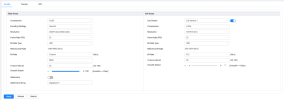
Settings:
What could be the problem?
I have multiple of the same model out in the field at different locations. (DH-SD6AL445GB-HNV-IR)
I've noticed that the recordings from one location are jumpy (I'm ingesting the RTSP stream in Python on a mini PC connected to the LAN via Ethernet).
Because it's a LAN, it should be super fast, and it has been working perfectly for months. But suddenly, the camera isn't sending frames smoothly.
It was sending 15 FPS, then 50 FPS, then 20 FPS, then 36 FPS, etc., jumping up and down.
Also, if I change encoding from 265 to 264, it drops to around 13FPS.
Where exact other models at other locations, all stick to a reading of a perfect 25FPS+.
Problem location:
Camera 192.............. | Subtype 0
------------------------------------------------------------
Smoothness: POOR
Startup time: 1262.72 ms
Camera reported FPS: 25.00
Actual received FPS: 23.76
Frames received: 4278
Failed reads: 0
Average interval: 42.09 ms
Median interval: 27.66 ms
95th percentile: 53.26 ms
Maximum frame gap: 579.63 ms
Frame jitter: 69.17 ms
Long frame gaps: 178 (4.16%)
Resolution: 2560x1440
OpenCV backend: FFMPEG
Camera 192.............. | Subtype 1
------------------------------------------------------------
Smoothness: FAIR
Startup time: 1313.43 ms
Camera reported FPS: 25.00
Actual received FPS: 25.13
Frames received: 4526
Failed reads: 0
Average interval: 39.79 ms
Median interval: 40.01 ms
95th percentile: 72.50 ms
Maximum frame gap: 183.39 ms
Frame jitter: 22.08 ms
Long frame gaps: 87 (1.92%)
Resolution: 704x576
OpenCV backend: FFMPEG
========================================================================================================================
SUMMARY
========================================================================================================================
Camera Stream Startup Set FPS Real FPS Jitter Max gap Long gaps Rating Status
------------------------------------------------------------------------------------------------------------------------
192.............. 0 1263 ms 25.00 23.76 69.17 ms 579.6 ms 4.2% POOR OK
192.............. 1 1313 ms 25.00 25.13 22.08 ms 183.4 ms 1.9% FAIR OK
Interpretation:
- Live FPS is cumulative from the beginning of the test.
- Jitter measures how unevenly OpenCV receives decoded frames.
- Maximum gap is the worst pause seen so far.
Other locations where it's fine:
========================================================================================================================
SUMMARY
========================================================================================================================
Camera Stream Startup Set FPS Real FPS Jitter Max gap Long gaps Rating Status
------------------------------------------------------------------------------------------------------------------------
192.............. 0 1238 ms 25.00 25.79 16.53 ms 146.1 ms 1.3% FAIR OK
192.............. 1 1059 ms 25.00 25.72 33.33 ms 184.9 ms 6.2% POOR OK
========================================================================================================================
SUMMARY
========================================================================================================================
Camera Stream Startup Set FPS Real FPS Jitter Max gap Long gaps Rating Status
------------------------------------------------------------------------------------------------------------------------
172.............. 0 1322 ms 25.00 25.12 11.38 ms 185.9 ms 0.5% GOOD OK
172.............. 1 1323 ms 25.00 25.14 5.37 ms 84.5 ms 0.0% EXCELLENT OK
Settings:
What could be the problem?

