I have the Auto Tracking functioning now. Have one "Preset1" and it tracks, how do I add more presets so the camera follows the subject or vehicle farther than the basic preset.
I expect Linking to other cameras is the next step

Couple of separate issues
1- You don't. Once a target is acquired and tracking begins from the "home" preset, other presets becomes a non-issue. The camera
should track the target as long as it can physically see it and until the target becomes motionless (for much shorter time than we'd all like). It no longer matters whether the target is within the original preset FOV or not. If it can't follow it, it wont matter if you have another preset, it still the same lens, same camera, same intelligence doing the tracking.
2- Added presets are usually set for other cameras to call the PTZ to an area outside of the view of the "home preset". Where it parks. OR for manual operation.
Linking to these additional presets is typically done by other fixed cameras on the system through the NVR. We call them "spotter" cameras. They have their own purpose/area of coverage, but
double as spotter cameras to direct the PTZ to a location it isn't looking at and cant see from its "Home" position
Each Preset on the PTZ gets its own set of IVS rules so it knows when it gets to Preset 2 for example, it knows how to detect and therefore track targets from this new position or its new "temporary home"
2a- you should also establish a rule to force the PTZ back to its original Home once its done tracking at another preset
3- Here's an example
Three cameras. 2 spotters and one PTZ
Each spotter is on opposite sides of the house.
The goal in this case is to get the PTZ to go to a designated preset based on direction of vehicle to zoom in for a plate capture.
Each spotter has different rules for Humans, and the PTZ different presets to track them again based on direction they are walking
*Note: In each example below, the PTZ didnt track anything or move on its own accord, it was commanded by the spotters to go to a Preset and wait for a passing vehicle to get a zoom on a plate.
Spotter #1 and PTZ result - see Truck trip the directional IVS line and send a signal to the PTZ to zoom in to a preset for capturing the plate
Note the timestamps. within 1 second, actually less
Also note Preset "LPR West" has no IVS rules. It can't therefore track from here. I dont want the PTZ to wander off from here, I want it to zoom and stay put until it gets a plate.
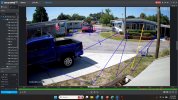
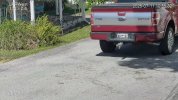 View attachment 192.168.1.110_ch7_20260711105520_20260711105536.mp4
Spotter #2 and PTZ result - opposite direction
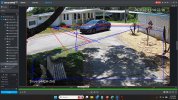
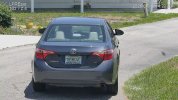 View attachment 192.168.1.110_ch7_20260711142210_20260711142226.mp4


